The iPhone fax app
Diesen Artikel auf Deutsch lesen
Use your iPhone as a personal fax machine in the palm of your hand. Municorn Fax sends and receives from your own fax number, tracks every fax to its destination and is HIPAA compliant. It’s as easy as email, we promise!
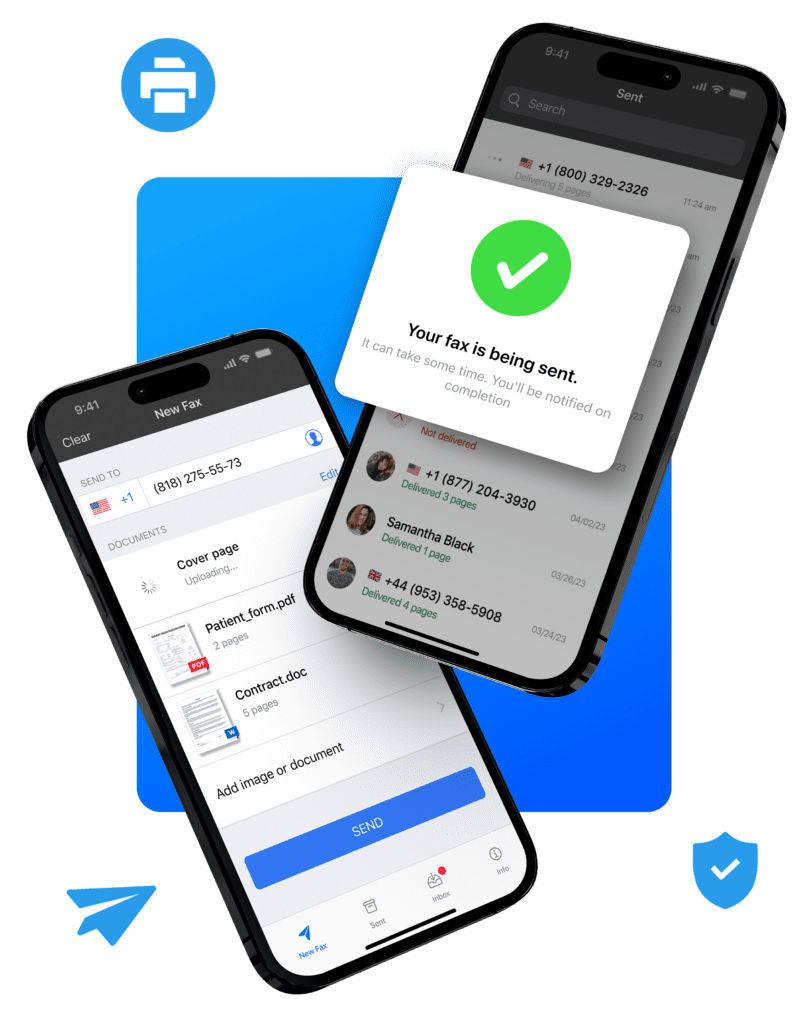
A fax machine that fits in your pocket
Three things you’ll use every time, shown in the app.
Send and receive on your phone
It takes minutes to send a fax from your iPhone, with no extra hardware: all you need is an internet connection. To receive, give people the fax number that comes with your plan, and faxes arrive in your inbox.
Track every fax
Any fax you send is tracked right up to its destination, so you know it arrived. Unlike a fax machine, the proof of delivery stays on your phone for as long as you need it.
Scan and fax
Scan paper documents with the camera and send them as faxes right away. No trip to an office store, which is both convenient and private.
Send your first fax
Add the document
Scan it with the camera, or pick a PDF, photo or file from iCloud, Google Drive or Dropbox.
Enter the fax number
Type it, or pick it from your contacts. Add a cover sheet if the other end wants one.
Send it
You’ll get a notification when it’s delivered, with the number of pages that went through.
The full walkthrough, with screenshots: how to fax from an iPhone.
Everything you need to fax
It’s like a messaging app, but for faxes!
Built-in scanner
Turn paper into a clean fax with the camera.
Any common file
PDF, DOC, JPG, PNG, TIFF and HTML.
Combine documents
Several files, sent as one fax.
Cloud storage
Fax from iCloud, Google Drive, Dropbox or Box.
Your own fax number
A US or Canadian area code, your choice.
Cover sheets
Write one in the app, or attach your own.
Sign before you send
Sign a scanned document, then fax it.
Contacts and history
Resend to a past number without retyping it.
Faxing abroad? It sends to 90+ countries on the same plan. More on international faxing.
iPhone, iPad and Mac
One download from the App Store, and it runs on all three.
On Android? Here’s the Android fax app.
Is faxing from an iPhone secure?
With Municorn Fax, yes. Most faxes go to medical, legal or government offices, where privacy matters most, so every fax is encrypted in transit and stored securely, and the app is HIPAA compliant.
Verified by Compliancy Group. More on HIPAA-compliant faxing and how secure online faxing is.
App, store or fax machine?
Unless you have a fax machine at home or in your office, it’s actually very hard to find one these days. Here’s how the options stack up.
| Option | You need | Cost | Receives | Best for |
|---|---|---|---|---|
| Municorn FaxThe app | Your iPhone | $9.99 a week or $249.99 a year, unlimited pages | Yes, on your own number | Faxing often, or from anywhere |
| A store counterThe UPS Store, FedEx, Staples | The paper, and a trip | About $1.50–$3 a page | At some stores, for a fee | A page or two, once in a while |
| A fax machineAt home or in the office | The machine and a phone line | The line every month, plus ink and paper | Yes, on the line’s number | High volumes on paper |
At $1.50–$3 a page, a week of Municorn Fax pays for itself after four to seven pages. Store prices come from our fax near me guides.
One plan, three ways to pay
Try it first with one free single-page test fax.
- Unlimited sending and receiving
- Your fax number, included
- HIPAA compliant
- Cancel anytime
- Unlimited sending and receiving
- Your fax number, included
- HIPAA compliant
- Cancel anytime
- Unlimited sending and receiving
- Your fax number, included
- HIPAA compliant
- Cancel anytime
App Store prices, billed through your Apple account. Compare the plans
What people say about it
Rated 4.8 from 370,000+ ratings on the App Store.
This is one of the best apps ever! If you don’t want to buy a fax machine and pay for a landline to connect it to monthly this is the best thing for you! Fax, conveniently right from your phone!
I needed to send an important fax and the process was simple, fast, secure, and I received a confirmation that the fax was successfully received. Yes, it will cost you $10 to subscribe for a week but it’s more convenient and likely cheaper than going to a store to do it. If you need to send an important document and don’t mind spending a few bucks to get it done I highly recommend this app.
Very effective for phone and iPad business on-the-go. Maximized my work away from office and home!
Read more reviews on the App Store · how it compares with other iPhone fax apps
Frequently asked questions
Do I get a fax number with the app?
Is Municorn Fax HIPAA compliant?
Is it free?
Do I need a separate cover sheet?
Can I scan a document and then fax it?
How do I know my fax arrived?
Does it work on iPad and Mac?
How do I cancel?
Your iPhone is already a fax machine
Download Municorn Fax and get your own fax number. Try it with one free single-page test fax.