Quick answer:Municorn Fax is our best online fax service overall — $9.99 a week for unlimited sending and receiving, international faxing included, HIPAA compliant, and 4.8 out of 5 from 364,000+ App Store ratings. If you would rather fax from a browser or straight out of your email, use EveryFax. eFax is the pick when a compliance department is involved, and if you send one fax a year a pay-per-page service like FaxSalad costs less than any subscription.
There are so many options for online fax, you might not know where to start! But don’t worry – we’ve tested and reviewed over a dozen of the most popular faxing services, to give you the ultimate list to find the best online fax service in 2026.
Online Faxing Is The New Way To Fax
The world of online faxing is huge and there are so many options to choose from, all promising to be the best value, the best quality, the most secure, etc. Search engines and social media feel like mostly advertising these days, and it’s no different when you’re looking for a fax service. Finding the right one can be overwhelming. So we bought all fourteen of them, sent the same two documents through every one, and wrote down what came back.
Whoever you are and however you need to send faxes, this list will give you the best recommendation on where to start.
Online Fax, Cloud Fax, eFax: What The Terms Mean
Half the difficulty in shopping for one of these is that the industry uses six words for the same thing. All of the following describe sending a fax over an internet connection instead of a phone line, and every service on this page does it:
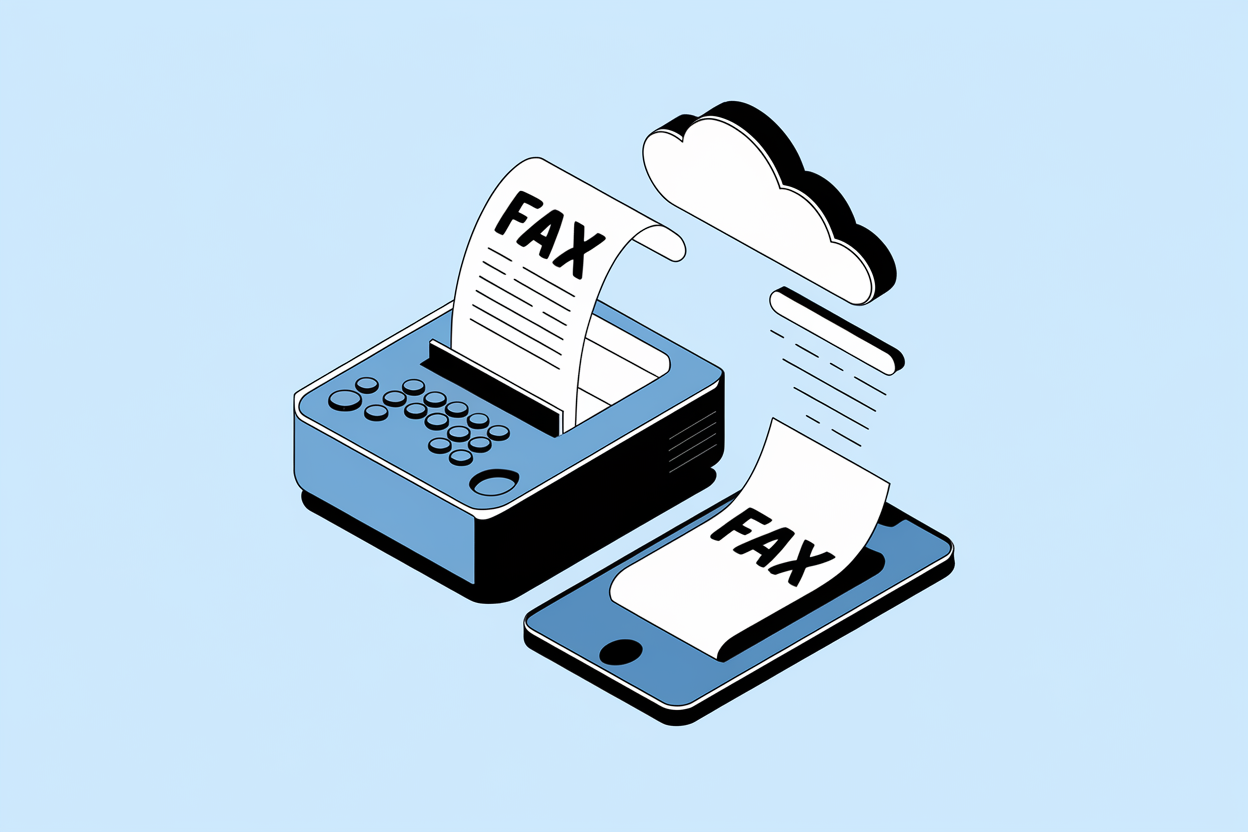
Online fax, internet fax, electronic fax, digital fax — interchangeable. Your document goes to the provider over the internet, and the provider hands it to the recipient’s fax machine over the phone network.
Cloud fax — the same thing, sold to businesses. It usually implies the provider also stores your fax archive and offers integrations and audit logs.
Virtual fax, fax number online — refers to the number rather than the sending. You rent a fax number from the provider and receive faxes to it without owning a machine or a line.
Fax to email, email to fax — the delivery method, not a separate technology. Incoming faxes arrive as email attachments; outgoing ones are sent by emailing the number.
One that does trip people up: eFax is a specific company, and it’s number two on this list — but plenty of people type “efax” when they mean electronic fax in general. If you searched for an eFax service and landed here, the whole list is relevant to you, and eFax the brand is reviewed below.
How We Tested Every Service
Every service here was tested on a live account, paid for where payment was required, and used the way you would actually use it. The two free options cost nothing by definition, and FaxBurner has a free tier we tried alongside its paid one. Then the same two documents went through all fourteen, to the same receiving fax number, and we compared what came out the other end.
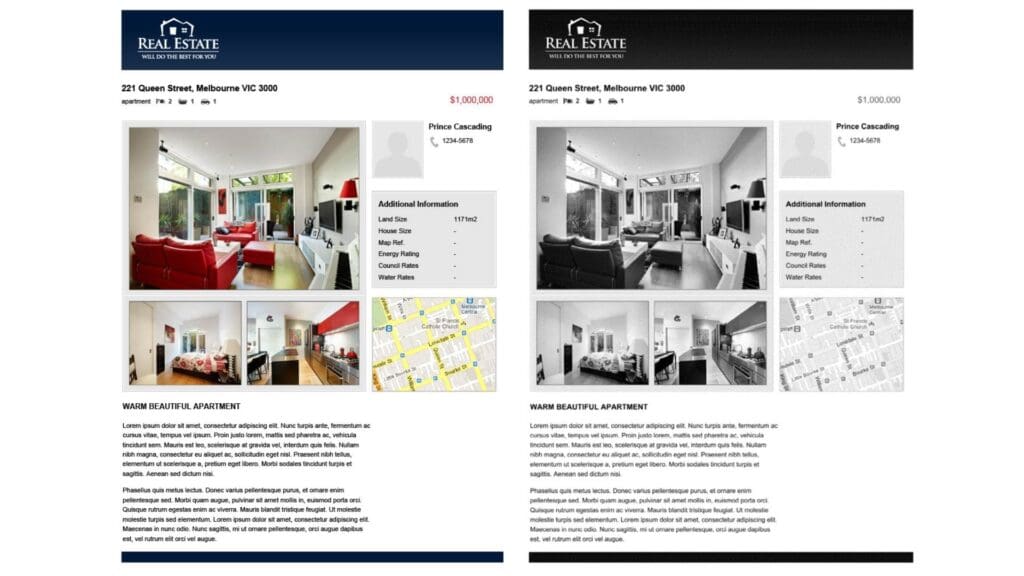
The two test documents are the same ones we use in every single-service review, which is what makes the results comparable across the site: a plain sample invoice and a sample brochure page. Between them they stress the things fax transmission actually breaks:
Small footer type and ruled table lines, which turn to mush at low resolution
Shaded blocks and gradients, where cheap services band or flatten the tone
Colour photographs, which have to survive conversion to black and white
A map and small graphical icons — the first things to disappear entirely
Mixed font sizes on one page, so we can see where legibility gives out
A text-only fax makes almost every service look competent. A brochure page does not, which is the point of using one.
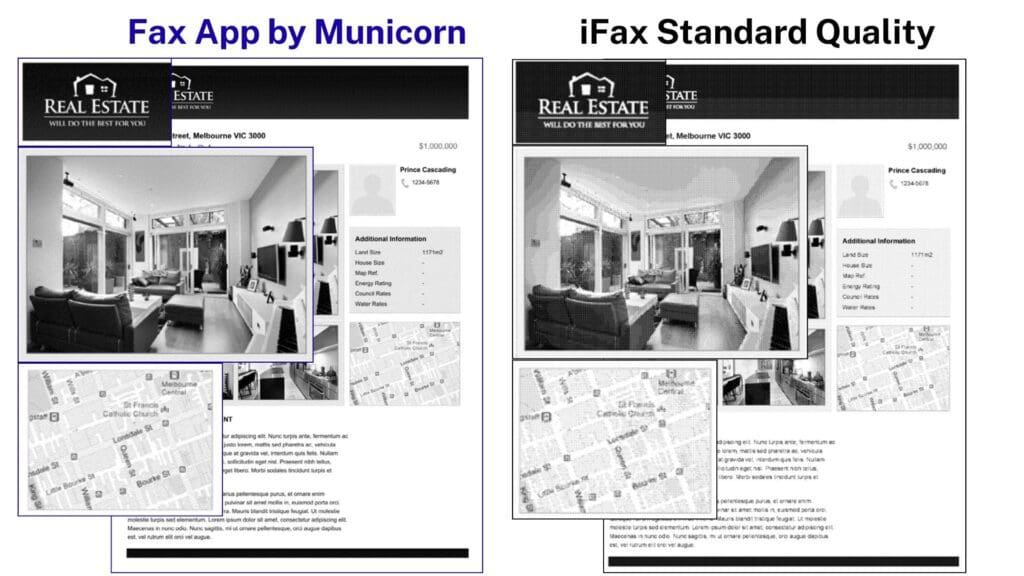
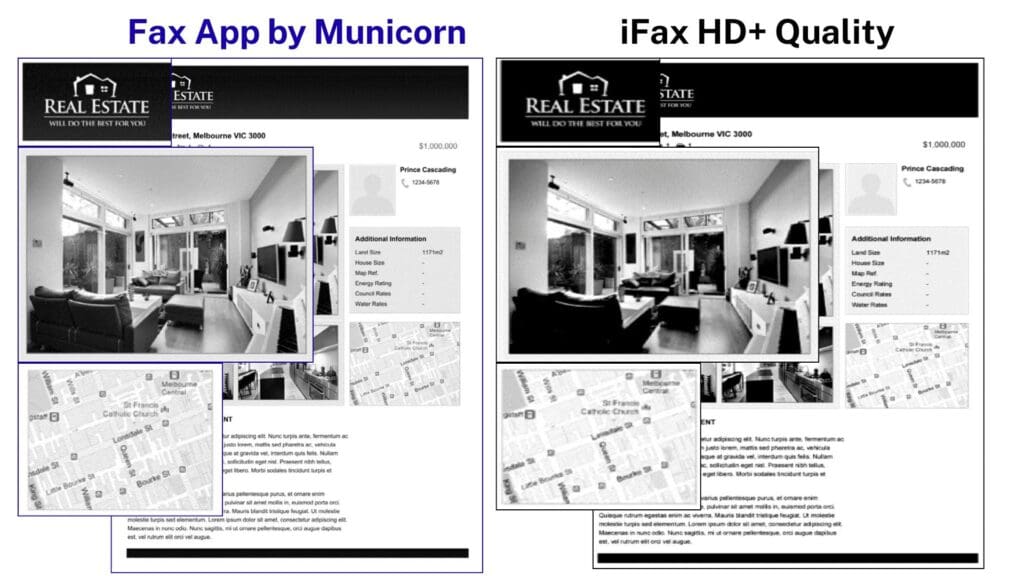
One thing worth stating plainly, because every comparison here rests on it: each scan on this page, and in every single-service review we publish, is that service’s output against a standard Municorn Fax send of the same document. Unless we say otherwise both are on their default quality setting, and where a service sells a higher-quality tier — as iFax does — we bought those too and say which one the scan shows. The baseline never moves, which is what makes these results comparable to each other rather than only to themselves. Where a service beats it, we say so.
We judged every service against the same five criteria. The score on each card is our overall verdict out of 5:
Quality
If the fax arrives unreadable, nothing else on the spec sheet matters. It’s also where price tells you least: iFax charges three credits a page for its highest HD+ setting, and it still didn’t beat a standard Municorn Fax send of the same brochure page.
Value
We signed up to all fourteen and paid whatever we were asked, on the plan a normal person would actually buy. The spread for the same thing is enormous: iFax wants $30 a month for 500 pages, Fax.Plus sells the same 500 for $13.99, and eFax’s standard plan stops at 30.
Security and Support
Five of the services here have no HIPAA path at all, and Fax.Plus keeps its signed BAA on the top Enterprise tier — which changes the price completely if you’re a solo practitioner rather than a hospital.
Popularity
What the reviews say, and how the developer answers them. Genius Fax holds 4.9 from 40,000 iPhone reviews. One pattern worth knowing across the whole category: most of these services rate lower on Android than on iOS, and the one-star reviews are almost always about billing rather than faxing.
Target Audience
Not the best service, the best one for you. SimpleFax is a one-time purchase under $10 capped at 20 faxes a month — unbeatable if that’s your usage, useless if it isn’t.
Here is what that looks like in practice. iFax charges extra credits for an “HD” and “HD+” send, so we ran the same brochure page through every tier it offers — and a standard Municorn Fax send held more detail than iFax’s most expensive setting.
The same brochure page, sent to the same receiving number, through iFax’s standard 1-credit setting and through Municorn Fax. Tested August 2025. Compare the photograph edges and the small footer type.The same page again, this time against iFax’s HD+ setting — 3 credits per page, its most expensive quality option. Tested August 2025.
Free services lose the most, and they lose it in a predictable order: shading first, then photographs, then anything small.
FaxZero, which is free, against Municorn Fax on the same test page. Tested July 2025.
One thing to be clear about: quality, usability, value and support are all judged from our own testing. HIPAA positions, certifications and uptime figures are what each provider publishes — we check that a BAA is actually available and note any tier restrictions, but we don’t audit anyone’s infrastructure.
The 14 Services Compared
Every service we tested, sorted by our rating. Tap a name to jump to its full review.
It came out on top because it was the most complete package we tried — no obvious weak spot the way most of the others had.
Price$9.99/week
Try it freeFree test fax
PagesUnlimited, every tier
HIPAAYes, with BAA
Score5/5
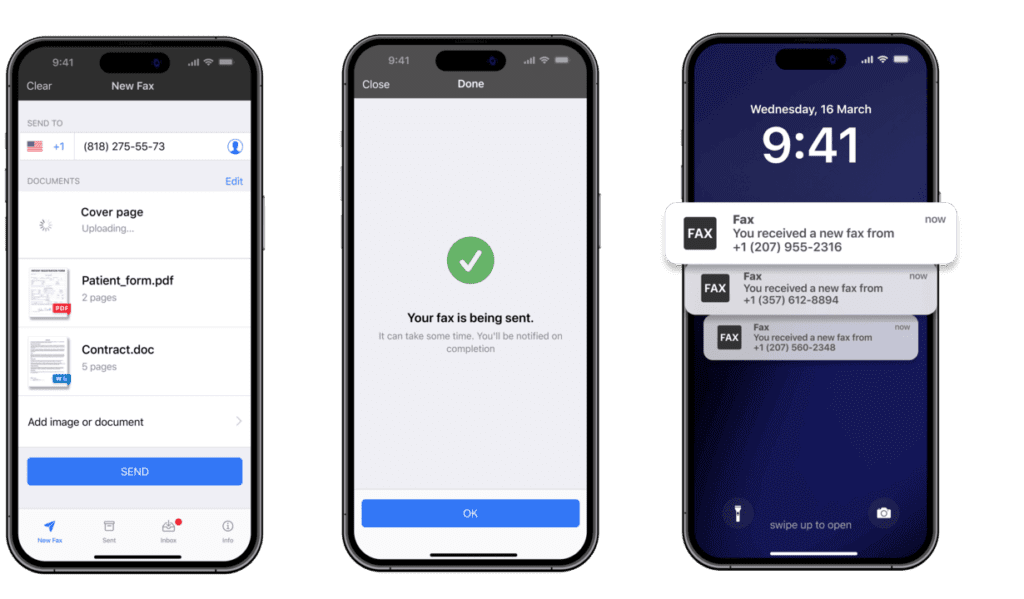
Municorn Fax was our top all-round pick. On quality, the faxes we sent came through cleaner than any other service we tested; when we compared results side by side, Municorn Fax held onto the most light and detail. The in-app scanner is good enough that you won’t need a separate scanning app, and you can pull documents from cloud storage, edit them, and send them in one place.
Value is where it really separates from the pack. At $9.99 a week you get unlimited sending and receiving on every tier — no page allowances to decode, no extra charges, and no surcharge for the 90+ countries it reaches. Most other services here cap your pages and charge more for extras, so for anyone faxing regularly this alone can save a lot over a year. You can also get a fax number in any US or Canada area code, or port one you already have. Faxing from Canada? Our guide to online fax services in Canada checks which services offer Canadian numbers and where they store your faxes.
On security and privacy, faxes are protected with AES-256 encryption at rest and TLS in transit, and the service is HIPAA compliant through Compliancy Group, with a BAA available on request — and compliance itself is included on every tier rather than sold as a higher-tier upgrade. There’s in-app live chat, and it is the most-reviewed service here, with 364,000+ ratings at 4.8 out of 5 on the App Store (Android sits a little lower at 4.5). And we’ve had 18M+ US downloads.
EveryFax is the sibling product for anyone who would rather not fax from a phone — the same network, reached through a browser or straight from your email. It carries unlimited faxing on every plan above the most basic, HIPAA compliance with a BAA on request, and 5-seat and 25-seat tiers that suit small teams in healthcare, legal and finance. Unlike the app, EveryFax does run genuine free trials, up to 30 days depending on the plan.
It’s not the right pick for everyone: because it’s built around unlimited subscriptions, the value shows when you fax fairly often — if you only send a fax once or twice a year, a pay-per-page option like FaxSalad costs less. But for regular faxing it was the strongest all-rounder we tried, and it’s an easy five stars from us. We go deeper on the iPhone build in our best iPhone fax apps round-up.
eFax has been a power-player in online faxing for over 2 decades now, and there’s a good reason for that. Offering an excellent service on basically any device (or by email-to-fax), eFax stands out particularly as a faxing solution for large businesses. Individuals can take advantage too, getting the security and quality that businesses like Google use eFax for, at a fair price.
PriceTiered subscription
Try it freeFree trial
Pages30/mo on standard
HIPAAYes
Score5/5
eFax is another excellent service which, in our opinion, deserves 5 stars. A well-established brand founded back in the 1990s, eFax has been at the forefront of enterprise digital faxing for decades now, and it has the awards, reviews and certifications to prove it. It’s not just enterprise offerings that eFax excels at — you can get an individual subscription that allows you to fax from any phone or computer, or even through your emails at no extra cost.
eFax is top-tier for faxing quality, features and customer support — but where it really stands out is security and enterprise support. eFax has all the top security credentials, beyond what most standard consumer faxing services include — such as ISO 27001 credentials, adherence to HIPAA, SOX, GLBA and PCI regulations, with a host of awards from publications like Forbes to match. eFax says over half of Fortune 500 companies use it, Apple, Google and Microsoft among them — its claim, not something we can audit.
eFax also supports wider business communication and how it might integrate with faxing, working alongside online file sharing services, e-signatures, online storage and interfaces for any type of device (mobile, email, computer, desktop). eFax Protect and eFax Corporate also build faxing into other applications, and can offer customers guidance on the regulatory restrictions for faxing certain information in certain industries.
Price-wise, eFax’s individual options aren’t the very best given the 30-page limit on their standard option, but their corporate pricing has a great reputation and you can get in touch with them directly to discuss. eFax does offer a free trial period if you want to try before you buy. Read our full eFax review here.
Fax.Plus is a super-sleek faxing service for every platform, and sets itself apart with some cool technical features. The customer service is also excellent and thoughtful. Pricing isn’t quite as flexible or optimised as we’d like, but everything else makes Fax.Plus a really good choice.
PriceFrom $6.99/mo
Try it freeFree tier, 10 pages
Pages500 on Premium
HIPAAEnterprise tier only
Score4/5
Fax.Plus is a really nice suite of faxing services. Available on all mobile devices, email, and computer, Fax.Plus offers very good value and customer support, but really sets itself apart with the technical features. Fax.Plus is packed with great features like document-signing, cloud storage integration, email receipts, scheduled-send, an amazing in-app scanner and fantastic filter settings, just to name a few. Whatever you need to do to prepare your fax, you can do it with Fax.Plus.
Fax.Plus is also a good value deal. Whilst there’s no weekly subscription option (which Municorn Fax does offer), the annual or monthly fee subscriptions are very competitive and come in a range of tiers, allowing users to choose the best option for them. However, there are page limitations, and in the smallprint we realised that faxes to certain destinations count as more than one page against your allowance — so Fax.Plus might not be the best overall value offering.
The customer support, however, is to the highest standard — the developers, Alohi, offer a huge range of tutorials and videos, and also a quick response team if you’re having any issues. What’s particularly useful is the ‘System Status’ page on their website, which gives detail of any outages or service issues, whether they’re controlled by Alohi or not, that might slow down your faxes. Alohi also shares no data whatsoever with third parties, giving you a privacy guarantee.
Whether you are using Fax.Plus to fax with mobile, on your computer, or even over email, they have designed a very stylish and helpful user interface which guides users through every feature of faxing in an incredibly natural way. It’s definitely one of the best-looking faxing apps we tested.
Quality and usability are both strong in our full review. What holds it back is HIPAA compliance sitting behind the top Enterprise tier, and the ‘optimise for image/text’ toggle making no measurable difference to the faxes we received. Read our full Fax.Plus review here.
A highly secure, HIPAA-compliant service with excellent fax quality and standout customer support — best suited to moderate or business faxers. The trade-offs are a bare feature set, no mobile app, a dated interface, and some extra charges to watch for.
PriceFrom $12.60/mo
Try it freeNot stated
Pages200/mo on entry plan
HIPAAYes, BAA on request
Score4/5
SRFax has been selling online fax from Canada since 2004, and it shows in who it serves: healthcare providers, government, financial firms and the legal sector. That focus explains both what SRFax is good at and what it simply ignores. Security and support scored 5 out of 5 in our full review — the only perfect mark we gave in that column anywhere on this list.
HIPAA and PHIPA compliant plans are both available, and requesting a business associate agreement is quick and straightforward rather than a sales conversation. Two-factor authentication is a couple of clicks in the settings, and there are junk-fax filters, which sounds like a small thing right up until you share a fax number with a whole department. SRFax states it uses 2048-bit encryption in transit and at rest.
Individual plans start at 200 pages a month for $12.60, but SRFax argues its case best higher up the range: at 5,000 pages a month it was $137.90 when we checked, against $208.33 for iFax and $159.99 for Dropbox Fax. If you need HIPAA at volume without an enterprise negotiation, that is a serious number.
The trade-off is that there is almost nothing else here. No dedicated mobile app, very few features beyond sending and receiving, an interface that feels its age, and extra charges for cover pages, international sends and OCR. We also hit page cropping on multi-page faxes. Fax quality itself was strong, at 4 out of 5.
One comparison worth carrying across from our own review: EveryFax’s unlimited business plan came in cheaper than SRFax’s 2,500-page tier, and the interface comparisons are on that page too. Read our full SRFax review here.
SimpleFax is one of the less popular services we tried — it won’t appear at the top of Google, but we gave it a chance and realised it’s a really nice option for people who don’t send faxes very often and don’t need any advanced technical features. SimpleFax is just that — very simple, but you get a lot of value out of it.
PriceUnder $10, one-time
Try it freeNone
Pages20 faxes/mo
HIPAAStates it offers it
Score4/5
SimpleFax is designed for people who only need to send faxes online occasionally — they’re not trying to be a fax service for anybody else! You pay once, under $10, for the app on Windows, iPhone or Mac — priced separately on each — and that’s all you ever pay. The allowance is what Furnace Creek calls the 20/20 rule: up to 20 faxes a month, up to 20 pages each. No extra charges or subscriptions going forward.
This is an amazing deal over the long run, so long as you’re okay with being limited on page numbers, and not having international faxing. SimpleFax also states that it encrypts your documents and supports HIPAA compliance, so it can be trusted to fax sensitive documents.
There are some drawbacks — the quality of transmission isn’t the best and it only supports PDF format documents, it reaches around thirty country codes rather than the 90+ some services cover, and there is also the risk that it changes to a subscription model eventually (like most online fax services have). Also, you’ll have to buy it again to use it on a different platform. However, overall SimpleFax is currently a very attractive value proposition for those who don’t regularly send faxes, and we love it. It’s one of the picks in our one-time fax options guide.
FaxSalad is designed for quite a small number of people, but it’s a great option if you are one of those people — somebody who doesn’t send faxes very often, and wants to use a web-based service to do it. You can use it for more than this, but for value, this is how we recommend you use FaxSalad.
PriceFrom $0.08/page
Try it free10 pages free
PagesPay per page
HIPAAPer-send option
Score4/5
FaxSalad is a web-based faxing service that operates on a ‘pay per page’ plan, all you need to do is top up your account with a minimum of $5.00, and then you can send faxes for as low as $0.08 per page for domestic faxes — a very low price. That $5.00 could last you years if you don’t fax very often.
FaxSalad isn’t the best standard offering for quality or security, but it does encrypt documents and comes with some flexibility — there is a “high quality faxes” button you can select when sending a fax to make the quality better, and also an option to send a fax as HIPAA-compliant in case you’re dealing with sensitive information like medical records (unfortunately, you cannot select both options!). Using these options will increase the charge of faxes slightly.
The flexibility doesn’t end there. You can also pay a monthly subscription for more faxes if you anticipate needing to send lots of faxes for a month, and there is also the option to rent a fax number at an additional cost, so the option to send and receive faxes is there if you need it. One last nice detail is that you can get 10 pages for free, so feel free to “try before you buy” on FaxSalad and see if you agree with us!
It might not be the best way to send and receive faxes — we used it through the browser, and other services have much better interfaces for seeing all of your sent and received faxes. FaxSalad now advertises email and smartphone access as well, which we haven’t retested. It also doesn’t charge for cover pages, which several services on this list do. But if you’re the target audience, FaxSalad is an easy 4 star option.
iFax is a very polished and user-friendly service, which stands out in offering some impressive technical features and good customer support. However, the average fax quality and the very high price is a barrier keeping it from getting 5 stars.
Price$30/mo (Plus)
Try it freeFree trial
Pages500/mo
HIPAAMost plans
Score4/5
iFax, which claims to be the very first online faxing app for iPhone, is a very popular service that offers a lot of fancy bells and whistles — AI integration, automation, OCR, document annotation and smart templates to name just a few. The web app for iFax is one of the most user-friendly and complete ways to fax online, and the mobile app is better than most others too.
iFax is also one of the top services for customer support and service — you can tell they’ve been doing this for a long time. You can even book a free welcome call with a customer service manager when you sign up, who will show you all the ways to use iFax. Certain higher tiers also come with a 24/7 support line, and every plan includes live chat support.
Security is just as good as the service, with HIPAA compliance offered under most packages and a range of security measures that keep your faxes and data safe.
However, there are a few significant drawbacks to iFax — the quality, and the price. We weren’t hugely impressed with the quality of the test faxes we sent. iFax has 3 different ‘quality’ levels you can choose from, which cost either 1, 2, or 3 credits per page. The standard option is 1 credit, and you can pay 2 or 3 credits to receive an ‘HD’ or ‘HD+’ fax transmission quality, for the more important faxes. We found the 2-credit option to be the worst quality, the standard 1-credit option to be below most other paid services on this list, and the 3-credit option to be average at best. None of them stand out as high-quality faxes.
This makes the second problem worse — the price. iFax is very expensive compared to most of the rest of this list. The ‘Plus’ option, which is the cheapest way to send and receive faxes, is $30 per month and doesn’t even include email-to-fax or other important features offered by its competitors. It also only includes 500 pages per month, and similar services like Fax.Plus will give you 500 pages on its $13.99 Premium plan — less than half the price.
If, however, you don’t mind spending more, iFax is a very high-powered service with advanced features and security — we recommend the free trial if you want to test the quality for yourself.
We sent the same two sample documents through all four of iFax’s quality settings. The 2-credit HD option came out worst of the lot, and the 3-credit HD+ option still didn’t beat a standard Municorn Fax send — which is why fax quality scored 2 out of 5 in our full review. The side-by-side scans are in the testing section above. Read our full iFax review here.
Dropbox Fax is a top-tier choice for businesses who want to integrate Dropbox and other cloud storage into their faxing solutions — if you’re running a business of any size you’ll definitely want to check this option out!
PriceTiered subscription
Try it freeNot stated
Pages300/mo at $10
HIPAAUnconfirmed
Score4/5
HelloFax became Dropbox Fax in 2022, so you might have first heard of it by its former name before it merged with the Dropbox brand. As we all know, Dropbox is a top-tier cloud storage provider, and as you might have guessed, Dropbox Fax is the solution that enables users to send online faxes or receive faxes online straight from their Dropbox servers.
Dropbox Fax offers total integration with not just Dropbox, but all major file sharing and cloud solutions, like Google Drive and SharePoint. Dropbox is a name most people already trust with their files, and that familiarity is a real advantage. We could not confirm a HIPAA position for the fax product itself, though — see below.
Dropbox Fax integrates with all major applications and the pricing is flexible for all business sizes. We’d recommend Dropbox Fax as a solid option for any type of business.
Fax quality scored 3 out of 5 in our full review: text came through cleanly, but graphics and shading lost detail against the same page sent with Municorn Fax. Read our full Dropbox Fax review here.
A secure, business-only fax service bolted onto RingCentral’s much larger cloud-communications platform. Solid quality and top-tier compliance — but it isn’t a fax-focused tool, and there is exactly one fax plan.
Price$27.99/user/mo
Try it free7-day trial
Pages3,000/user/mo
HIPAAYes, HIPAA + HITRUST
Score4/5
RingCentral has led cloud phone systems for a decade: founded in the late 1990s, over $2.5 billion in annual revenue, and a Gartner Magic Quadrant leader eleven years running. More than 500,000 businesses use the platform, 22,000 of them healthcare organisations. As a fax service specifically, though, it’s narrower than that pedigree suggests.
Compliance is the strongest argument for it — HIPAA, HITRUST, AICPA and GDPR, which is more than most fax services can list. You can fax from anything: web app, Windows and Mac apps, Android and iOS, plus email-to-fax and fax-to-email. The integrations with other business software are the best on this list. And one genuinely uncommon extra: for a $30 one-time fee you can buy a vanity fax number with words in it.
There is one fax plan. Fax 3000 gives you 3,000 pages per user per month at $27.99 per user, including sends to 105+ countries. Climbing RingCentral’s wider tiers doesn’t improve the faxing at all — Advanced is as good as it gets. Under 3,000 pages a month that’s decent value; above it, or for one person who wants flexibility, it isn’t.
User friendliness scored 2 out of 5 in our full review, and that’s the honest weak spot. The interface is full of phone, video and messaging you can’t use on a fax plan, and it leaves out things much cheaper services include as standard: in-app scanning, document editing and signing, fax preview, folder organisation. It’s businesses only. RingCentral’s Trustpilot score was 1.9 out of 5 when we checked, mostly about support responsiveness and occasional outages — Trustpilot skews unhappy in every category, but it’s worth knowing before you commit a team to it.
In our own price comparison at that tier, only EveryFax matched it: $37.99 a month for unlimited pages across five users, against RingCentral’s 3,000 pages for one. Read our full RingCentral Fax review here.
Genius Fax offers a powerful way to scan, edit and fax documents from mobile phones. From a great company with great reviews, this might be the most complete way to send and receive faxes if all you have is a mobile device. The value could be better, but this is a great service.
PriceCredits + subscription
Try it freeNot stated
PagesCredit-based
HIPAAVaries by plan
Score3/5
Genius Fax, available on iPhone or Android, is the sister app to Genius Scan — a very popular and powerful scanning app. Together, the two apps are a fantastic way to scan, edit, and fax documents all from your mobile device. The two apps offer anything you would be able to do in the office — whether that’s digital signatures, document editing or other convenient fax features.
The app is very easy-to-use on any device, and the customer support is outstanding — the reviews back this up, with the iPhone app in particular earning a 4.9 average rating from 40,000 reviews, which is very impressive!
The only drawback is that the value could be better — you have to buy credits in order to send faxes, but to receive incoming faxes and get your own fax number, you need to purchase a separate subscription on top, meaning that as a complete faxing solution it can be quite expensive. Despite this, Genius Fax is a great option for mobile faxing, and worth checking out.
FaxBurner’s low price and basic offering makes it popular for people who want to send less important faxes on a budget. It also offers a completely free version, which is a useful way to receive occasional faxes without paying anything. It’s basic and unsecure, but FaxBurner is a great choice for some folks.
Price$15 / 500 pages
Try it freeFree tier
Pages500 pages
HIPAANo
Score3/5
FaxBurner offers iPhone and Android apps, as well as a web faxing option and email-to-fax, making it a versatile low-cost online faxing service.
As far as fax quality goes, you get what you pay for, and FaxBurner doesn’t send images or graphical documents particularly well — but it does a good enough job at sending text documents like letters or invoices.
Security is a similar story — FaxBurner doesn’t offer advanced protections like HIPAA compliance, and there’s not many ways you can get hold of a member of staff besides filling out an online form and waiting to hear something back. Therefore, we wouldn’t recommend you fax anything sensitive or confidential using this service!
Despite these limitations, FaxBurner is very popular with its users because it provides a cheap way to send and receive faxes. You can get 500 pages for only $15 — less than half the price of iFax’s 500-page plan (which doesn’t include email-to-fax), so if you just want to send basic faxes via mobile, web, or email, this is a great choice.
FaxBurner also has a ‘free’ option which lets users send 5 pages in total, but you can receive 25 pages a month, forever, for free. You’ll only be able to use a temporary number for 24 hours at a time, but a lot of people find this plan useful too.
If you’re looking for a low-cost way to handle unimportant faxes, or even a free way to receive the occasional fax, FaxBurner is worth checking out.
Fax quality scored 2 out of 5 in our full review — we faxed the same image through FaxBurner and Municorn Fax to compare, and most of the shading disappeared. It’s also unclear from FaxBurner’s own material whether international faxing is supported at all. Read our full FaxBurner review here.
HumbleFax has a very simple offering: there’s just one plan available, you pay $10 per month and get unlimited faxing. There are of course a few drawbacks — no mobile apps or high security and an average service, but if you can overlook the drawbacks, there’s no doubt this is one of the best value deals out there.
Price$10/month
Try it freeNone
PagesUnlimited domestic
HIPAANo
Score3/5
HumbleFax is the most simple and straightforward service on this list — whoever you are, you pay $10 per month, and you get unlimited faxing from the HumbleFax website. That’s it, that’s the whole service.
Not many services on this list offer truly unlimited plans like this — making HumbleFax instantly one of the best value deals on this list. You can use HumbleFax’s web app, or email-to-fax, to send and receive faxes once you have signed up and created your own fax number.
As far as quality goes, HumbleFax isn’t that bad for the price. It’s not perfect, but you’ll be able to send most things with confidence — the only time we found big problems was faxing documents with large images or graphics. It’s also quite easy to use, the website is nice and straightforward to get the hang of.
The main drawbacks to HumbleFax are the lack of any mobile app, which makes faxing on the go very difficult — you’ll either need to find a separate scanning app to prepare your faxes and then email them, or just fax from a computer. Security is also a big concern, as HumbleFax doesn’t offer advanced protections or HIPAA compliance, so we’re afraid this isn’t a cheap and safe way to send documents to your healthcare providers.
HumbleFax is in a very short list of services offering unlimited faxing plans — the others on this list being Municorn Fax and EveryFax. Those services offer much more than HumbleFax in terms of quality, mobile apps, security and HIPAA compliance, as well as international faxing included in the price with Municorn Fax. This puts HumbleFax at a disadvantage in the ‘unlimited faxing’ options, however it is very low-cost, so for unimportant high-volume domestic faxing it’s incredible value.
Fax quality scored 3 out of 5 in our full review — below average, and the trouble showed up on the brochure page rather than the invoice. In-depth HumbleFax review here.
MyFax is a budget-friendly service from the makers of eFax, which is aimed at individual faxers only, with no corporate support or pricing plans. It’s supposed to offer better value to people who don’t fax as much and don’t need extra security, however it makes everything about eFax much worse, and isn’t particularly great value either.
Price$12/month
Try it freeNot stated
Pages100/mo
HIPAANo
Score2/5
MyFax offers all the same ways you can fax with eFax — web, mobile apps, or email-to-fax, but it was created to provide a stripped-down, less complete faxing experience than eFax for folks who don’t want to spend as much money. This means cheaper prices, but it also means less security, worse apps, no HIPAA compliance, and very little customer support.
The fax quality is about average — it certainly isn’t as good as eFax, but it’s better than most budget services. However, the big issue with MyFax is that the value isn’t there — yes it’s cheaper than eFax, but not by that much, and the cheapest plan is $12 per month for 100 pages per month. You can get unlimited pages and the same level of security (i.e. none) with HumbleFax for $2 less than that. Their more advanced package is $25 per month, but for only 300 pages and no HIPAA compliance, this is very bad value compared to other services on this list.
It’s unfair to compare the rest of the service to eFax — the user experience, security, and customer support offered is not as strong, and the only way you can actually get in touch with a member of the support team is to fax them — which might not be ideal if you’re having a problem sending faxes!
MyFax has all the hallmarks of a very low-cost fax service — except for the most important thing: the price.
Fax quality scored 3 out of 5 in our full review — the brochure page came through better than we expected for a budget service, but the shaded graphics still softened against the same page sent with Municorn Fax. Read our full MyFax review here.
We’ve put GotFreeFax and FaxZero together in one ranking here, since they’re both very similar — totally free online faxing services with no strings attached — you can use these without ever paying a penny. However, you do get what you pay for, and they are extremely limited. Therefore, we cannot rank them alongside the rest of this list — but we want to include them as good options in certain circumstances!
PriceFree, ad-supported
Try it free2/day and 5/day
Pages3 pages per fax
HIPAANo
Score2/5
You get what you pay for with faxing, so free services are never as good as the moderately-priced alternatives. Still, there are a few solid basic options for sending faxes free. Obviously, we wouldn’t recommend these options for faxing anything important, since they are not as secure as paid faxing services.
That’s where GotFreeFax and FaxZero come in. GotFreeFax is a free online fax service that allows users to send a limited number of free faxes per day (inside the US and Canada). Users get 2 free faxes per day with 3 pages per fax, with the option to pay for any more.
FaxZero is very similar to GotFreeFax, except supporting more file formats and giving users 5 free faxes per day, again with the option to pay for more. However, it’s slightly harder to use, it brands your cover page with its own logo, and there is no free option to receive incoming faxes, whereas there is with GotFreeFax.
You don’t need to sign up for anything — simply enter the details of the fax on the website, hit send, and your fax will send in only a few minutes. It’s very good at providing you with updates on the status of your fax, and even allows you to receive faxes online for free, all at a reasonable quality.
Being a free service means you get bombarded with ads when using these services — there’s no way around it, and there are even advertisement links on the email updates you receive, which can be quite confusing. It also only supports a limited number of file formats.
These are definitely not the best options on this list, but they’re also totally free. If you have a very unimportant and short fax to send to someone, you might be able to use these services with no problems.
GotFreeFax scores 3 out of 5 overall in our full review and FaxZero 2 out of 5 — neither breaks quality out as a separate score, but the FaxZero comparison scan is in the testing section above. Both have full reviews of their own: GotFreeFax and FaxZero.
Price comparisons between these services are hard because they aren’t selling the same shape of thing. There are five pricing models on this page, and picking the right one matters more than shaving a dollar off the monthly fee.
What You Actually Pay: Subscription, Pay-Per-Page Or Free
The five ways the services on this page charge you, and who each one suits.
Model
How it works
On this list
Best if
The catch
Unlimited subscription
A flat weekly or monthly fee with no page counting at all
Municorn Fax $9.99/week; HumbleFax $10/month
You fax more than a few pages in a typical month
You pay in the months you don’t fax
Tiered subscription
A monthly fee buys a page allowance; more pages means a higher tier
eFax, Fax.Plus, iFax ($30/mo for 500 pages), SRFax (from $12.60/mo for 200), RingCentral ($27.99/user for 3,000), MyFax ($12/mo for 100)
Your volume is steady and predictable
Allowances don’t roll over, and some providers charge two pages for one slow page
Pay per page
You top up a balance and spend it a page at a time
FaxSalad, from $0.08 a page after a $5 minimum top-up
You send a handful of faxes a year
Receiving usually costs extra or is not offered at all
One-time purchase
Buy the app once, keep using it
SimpleFax, a one-time purchase under $10 for up to 20 faxes a month
You want nothing recurring on your card
Licensed per platform, page caps, no international faxing
Free, ad-supported
A couple of short faxes a day at no cost
GotFreeFax 2/day; FaxZero 5/day
The document is short and not sensitive
Ads, a branded cover page, and no HIPAA compliance
The crossover point is lower than most people expect. At $0.08 a page FaxSalad beats a $9.99 week until you are sending well over a hundred pages, but the moment you need to receive faxes as well, the pay-per-page options stop competing — most of them either charge to rent you a number or don’t offer receiving at all. Municorn Fax has no pay-per-fax option and no free tier, but it does let you send one free single-page test fax before you subscribe, so you can check the quality on your own document first.
Bottom Line
After testing every service on this list, the honest answer is that the best pick depends more on your situation than any single ranking. For most people — occasional senders, small businesses, anyone who just needs it to work — Municorn Fax, eFax, and Fax.Plus are all solid choices at different price points. For strict compliance, eFax and SRFax are the ones with the credentials to back it up. If you’re sending rarely and hate subscriptions, SimpleFax or FaxSalad make more financial sense than paying monthly for something you use twice a year.
Online faxing in 2026 is in better shape than it has ever been. All 14 services here are functional — the differences come down to price, polish, and how well they fit your workflow. Pick the one that matches how you actually work, not the one with the longest feature list.