
Genius Fax (styled GeniusFax) is the companion app to Genius Scan, a hugely popular scanning app for iPhone and Android, allowing anybody to fax without a fax machine.
Genius Fax is a basic, user-friendly and reliable service which provides great value and a very flexible pricing model for its users, especially benefitting those who don’t send or receive faxes regularly.
However, Genius Fax comes with some downsides, particularly a lack of features and a pricing model which may confuse some. The fax quality is also slightly below average compared to other popular services.
The Good
- Very user-friendly experience
- Mobile app and web faxing options
- Paired with Genius Scan, a very good app to scan documents before faxing
- Flexible and very transparent credit pricing model
- Tremendous value for people who fax very rarely
The Bad
- Pricing model more confusing than most other apps / online fax services
- Lack of features
- Fax quality is not great
Overall Score: Four Stars ★★★★☆
Created by French company The Grizzly Labs as a sister app to the brilliant Genius Scan (as well as Genius Sign), Genius Fax has also received hugely positive feedback from its users, who love the simplicity, transparency and value it offers as an online fax service.
Genius apps are a regular fixture in the top business apps for Apple and Android, and Genius Fax’s simple and beautiful UI makes sending faxes an easy task from your phone or computer. It offers fair and very transparent value to its users, and is an especially affordable option for those who don’t frequently send faxes.
Genius Fax is ultimately held back from a perfect review by several key factors – firstly, the fax quality is not at the same standard as other paid fax services, which can result in files being blurrier, transmitting less detail in image files. Furthermore, the lack of features is very noticeable when you’ve used other faxing services.
For our review of Genius Fax, we have tested it on mobile and on the web, faxing a sample invoice, and sample brochure page. These two documents are common types of files that people might send as faxes, and have a number of elements such as text, color, and images.
We have scored Genius Fax on four key areas:
- Quality
- User Experience
- Price
- Security & Customer Support
Quality | ★★★☆☆
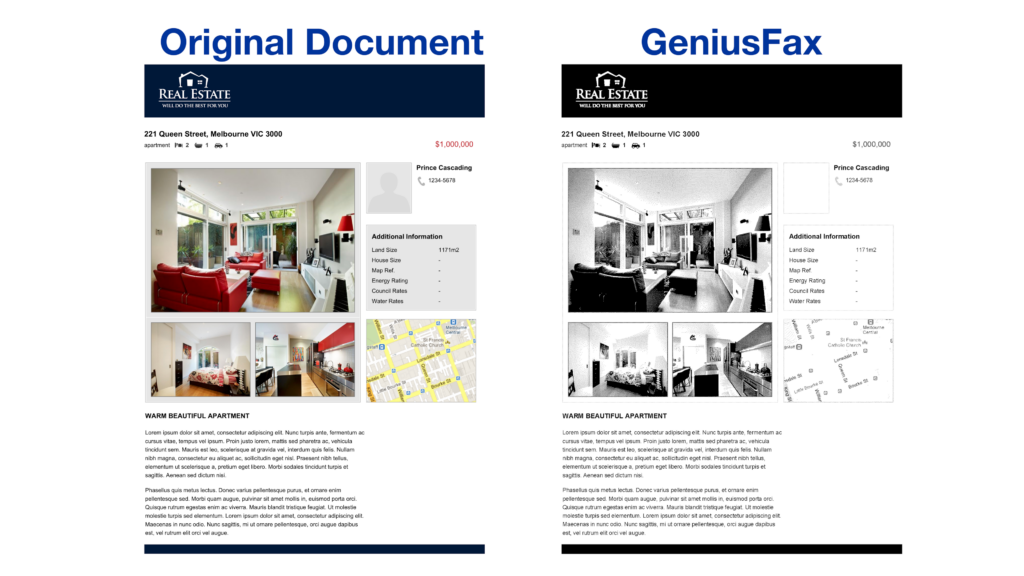
Fax quality is arguably the most important thing any fax service has to get right, and unfortunately this is where Genius Fax comes up average at best. To see why, we can focus on the brochure page test which we sent with Genius Fax, and compare it to other faxing services.
Genius Fax does do some things very well – the detail on the photographs has been transmitted to a higher level of detail than most other faxing services, for example. Services like Fax.Plus and iFax had much worse photographs than the example below.
However, when we look at the detail on the right of the page, Genius Fax has fallen short. There is a complete loss of detail in the person icon, the shading has disappeared from the ‘Additional Information’ box, and the map has lost most of its detail.
Overall, it can be said that whilst photographs and text transmit very well, Genius Fax has not managed to preserve all the detail on a very common type of document users might send, which might make sending a PDF or image file difficult.
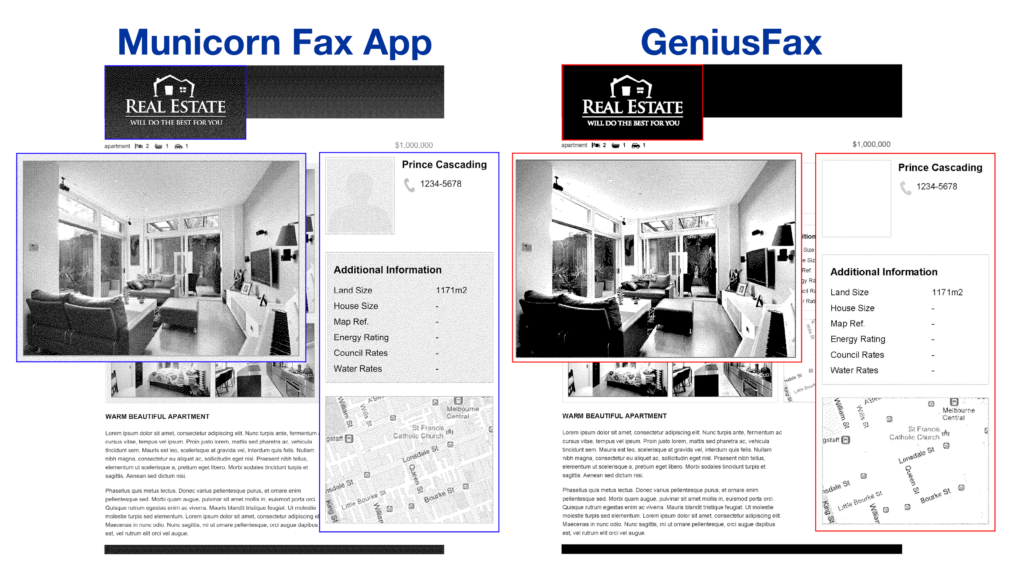
We can compare this to another leading fax service to see the difference – in this case, Fax App by Municorn, which is also available on iPhone and Android. When the two are compared side-by-side, there is a clear difference in quality of the shading in the photographs and along the top banner, and the Fax App has preserved all the detail on the right side of the page.

If we zoom in, the difference in quality becomes even more noticeable and stark. Any fax service which costs money should be preserving more detail than the Genius Fax test in this example did.
The speed of transmission however, was very good – with under 1 minute per page we sent. This can be up to 6 or 7 minutes for other fax services, and whilst the capacity of the network can play a role in fax speed, this is still a very impressive speed, and so users can be confident that their faxes will send in quick time.
User Experience | ★★★★☆
Genius Fax offers a very intuitive and simple user experience, making it easy for anybody to create a Genius Fax account and begin using it confidently in a matter of minutes.
Firstly, the web platform means you can send faxes from any computer or phone without an app, and similarly to the mobile app, it’s designed with a ‘one page’ focus – you can see all your sent and received faxes, your account credit information, and the send button, all from one dashboard.
This is a very simple and helpful way to structure a faxing service – many others will have different pages for inbox, sent faxes, drafts, account information, etc., but having it all in one very simple and attractive menu makes using Genius Fax an enjoyable experience.
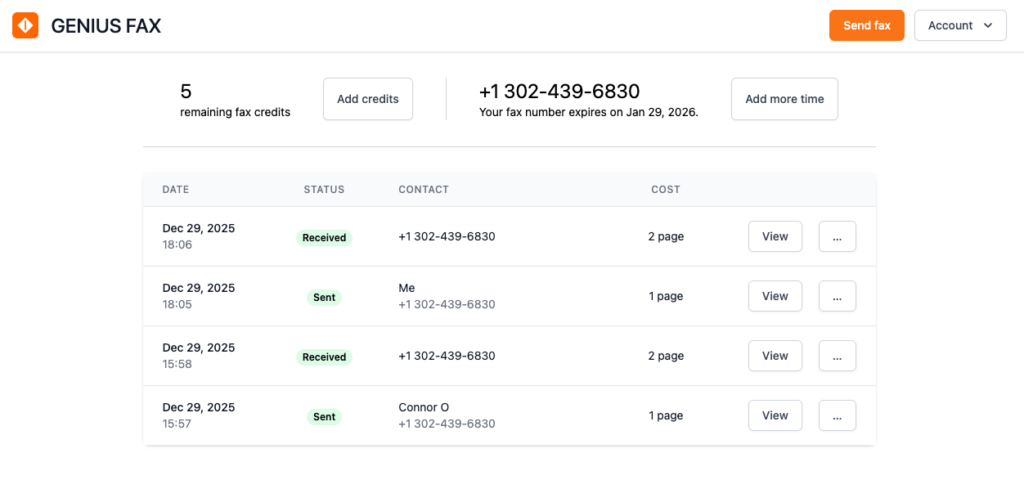
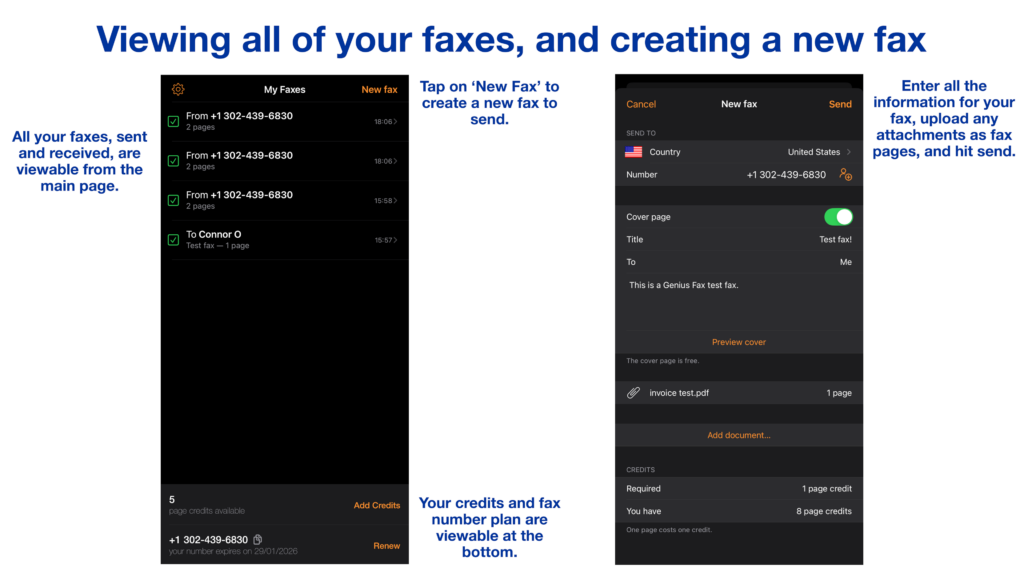
The mobile app is structured the same way – allowing users to see all of their faxes, their fax number, how many credits they have left, and how to send a new fax, all from one page. Creating a new fax is just one click away, and the app makes it very clear how to input all of the recipient details, attach any files you want to send, and then preview your fax before you hit send.
Scanning documents is another highlight of using Genius Fax. The Grizzly Labs, after all, is a scanning company first, and sells their digital scanning technology to other companies all over the world. The mobile app has very good scanning, with features like automatic border detection, auto-scanning, and document straightening, along with other tools such as filters and cropping.
If you want even more highly advanced scanning and editing features, you can simply download Genius Scan and use that app to prepare your fax. Genius Scan has even more ways to edit, sign, and annotate documents before you are ready to fax them. For those who aren’t scanning, Genius Fax supports documents which are PDF files or JPEG image files – this is far less file types than many other faxing services support, however.
Besides scanning, however, Genius Fax is not heavy on features. Many other fax services allow users to do basic things like schedule faxes, or save drafts, but this is not possible with Genius Fax.
Genius Fax also does not support email-to-fax, which many other apps do include as standard. Email-to-fax allows users to send faxes using their online fax service entirely from email, which can be more convenient for many users.
Price | ★★★★★
It’s probably best to start with the downsides of Genius Fax’s pricing model. Genius Fax has 2 different types of charge:
- Users purchase fax credits which enable them to send or receive faxes. One credit = one fax page sent or received (you can get a free cover page with every fax).
- Users can also rent a fax number for a certain period of time with fax number subscriptions. If they do not do this, they will not have a dedicated fax number to receive faxes to.
This is more complicated than most other fax services, where you’ll often be charged a regular subscribe cost (on a weekly, monthly, or annual basis) which will give you a fax number, and a certain number of fax pages to send and receive. Some users might not like the Genius Fax way of pricing, however for certain users it does offer advantages.
Chiefly, if users don’t fax very often, and may not want to receive faxes as much as they send faxes, this can be a cheaper way to fax. When you add credits with Genius Fax, those credits do not expire until they are used. Conveniently, buying credits in bulk to use over an extended period of time is more cost-effective for irregular faxers than keeping a monthly subscription which isn’t used very often.
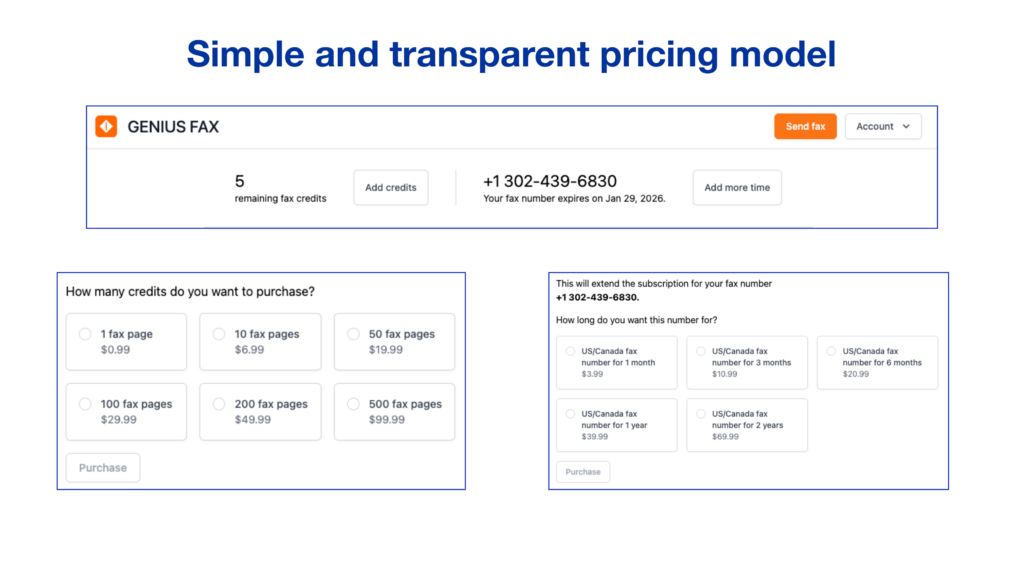
Another fantastic thing about the pricing for Genius Fax is how transparent and fair to the user it is. The prices are incredibly clear, and the app is constantly reminding you how many credits you have left, and how much longer your fax number will last.
By fair, we don’t necessarily mean cheap – there are cheaper faxing services available – but Genius Fax is the only app we have tested which automatically does not auto-renew your monthly subscription when you get your own fax number. By default, this means if you forget about a subscription you’ve made, you cannot be charged for months before realising. Genius Fax is also very fair in the sense that your credits last forever.
Another final positive on price is the fact that select international fax numbers are not charged as extra – there are 46 international destinations supported, and for any supported country 1 credit = 1 credit. Most other services charge extra for faxes sent or received outside of the US and Canada.
Overall, despite being more complex than other fax apps, Genius Fax represents a strong value proposition for most users, especially people who fax infrequently. Whilst it isn’t the very cheapest, it is still a good deal in the online fax service market.
Security & Customer Support | ★★★☆☆
Genius Fax is a slightly mixed bag when it comes to security and customer support.
To start with security, Genius Fax does not have the significant security credentials that many other fax services have. It has not been designed to process Protected Health Information, and is not HIPAA-compliant – this means that the service is not following the measures needed to be fully compatible with the Privacy Rule under HIPAA, and is generally not recommended as the best secure way of transmitting sensitive healthcare information. This puts it at a huge disadvantage and may put many users off.
The basic security measures are there, such as encrypted storage and encryption in fax transmissions. Genius Fax also does not share any of your data with any external parties. Since Genius Fax is also based in the EU, it must follow GDPR regulations when handling all user information.
On the customer support side, there are several basic features users can rely on for guidance – such as an extensive FAQs section, and an email address which users can send questions to. Other fax services do far more than this, however, with services such as EveryFax and Municorn’s Fax App offering live chat to customer support, and iFax offering a 24/7 phone line to customers.
Customer feedback, however, cannot be ignored, and Genius Fax enjoys a 4.9 average rating from over 41,000 reviews on the Apple store.
Genius Fax: Four Stars ★★★★☆
Genius Fax is a simple, convenient way to send faxes from mobile or computer. Whilst the fax quality is below average and it may not be the most secure service, it represents great value and is a very user-friendly way to fax for many people. Despite its flaws, it’s one of the better ways to send and receive faxes digitally, especially if you pair it with Genius Scan – one of the best scanning apps in the world.
Genius Fax Alternatives
- Fax.Plus matches the modern, user-friendly interface of Genius Fax but adds significant functionality. Unlike Genius Fax, it includes email-to-fax capabilities and scheduled sending as standard features. It is a more robust choice for users who want that slick app experience but require HIPAA compliance and cross-platform flexibility between web and mobile.
- eFax If Genius Fax feels too basic for your business needs, eFax is the heavy-duty upgrade. It offers the enterprise-grade security, unlimited storage, and third-party integrations that Genius Fax lacks. It is the ideal choice for corporate users or those handling sensitive legal and healthcare documents who require industry-standard compliance rather than a simple pay-as-you-go model.
- iFax For users who want a mobile-first experience like Genius Fax but need higher security and support, iFax is a strong contender. It bridges the gap between a simple fax app and a professional business tool by offering 24/7 support and banking-grade security features. It is particularly well-suited for freelancers and small business owners who need reliable HIPAA compliance on the go.