Quick answer: SRFax is a highly secure, HIPAA-compliant online fax service with excellent fax quality and standout customer support — best suited to moderate or business faxers. The trade-offs are a bare feature set, no dedicated mobile app, a dated interface, and some extra charges (cover pages, international, OCR) to watch for. Overall: 4 out of 5.
SRFax
SRFax is an online fax service which positions itself as a highly secure and technical, yet consumer-friendly option to send and receive faxes.
Available via PC, Mac, email, printer and from mobile devices, SRFax comes with advanced security and a team of expert faxing specialists, and its high quality faxes make it a strong choice for people sending documents with important or sensitive information, as well as for companies. It particularly stands out for those with medium faxing needs.
SRFax is however, quite limited in other ways – the lack of a dedicated mobile app having almost zero extra features are big drawbacks, as well as some extra charges and user experience issues.
The Good
- Strong security and HIPAA compliance
- Reliable customer service team with a strong reputation
- Impressive fax quality
- Not bad value, with lots of subscriptions to choose from
- Very good option for businesses
The Bad
- Very few features and tools beyond simply sending/receiving faxes
- No dedicated mobile app
- Some extra charges can apply
- User experience is better on other services
- Some page cropping problems with multiple-page faxes
About SRFax
SRFax is a Canada-based company, who since 2004 have been providing SaaS online fax solutions to individuals and corporations, helping folks fax without physical fax machines. SRFax serves key industries such as healthcare providers, governments, financial organisations and the legal sector, which means it places a huge focus on security and customer service.
Serving businesses of every size, SRFax offers a large variety of plans and subscriptions. It provides a range of specialist support tailored for small businesses or those on larger plans, such as fax API, printer driver support, multiple accounts/fax numbers, and specific Healthcare solutions. SRFax is also available to individuals, and has plans starting from 200 pages per month at $12.60.
SRFax excels with its security credentials and customer support team, with a dedicated phone line of specialists based in British Columbia and a helpful Developer support section on their website. SRFax also provides excellent fax quality, especially when compared to most similarly-priced online fax services.
However, there are some key issues that come with SRFax – the first is the stark lack of features. This is apparent when you compare most online fax services, which have dedicated mobile apps, to SRFax. SRFax fails to meet most of its competitors with features, tools, or user experience.
SRFax fundamentally feels like it was built as a corporate-specific faxing solution first, which was built as such and then offered to individuals. It does not feel like most mainstream fax services, which are aimed at individual users and/or corporations.
For our review of SRFax, we have tested it on mobile and on the web, faxing a sample invoice, and sample brochure page. These two documents are common types of files that people might send as faxes, and have a number of elements such as text, color, and images.
We have scored SRFax on four key areas:
- Quality
- User Experience
- Price
- Security & Customer Support
Quality
Fax quality is one of the most important things to look for in a fax service, and SRFax does very well in this regard. Across our two tests, the brochure page document in particular was transmitted with a high level of detail and clarity. The photographs are clear and detailed, all of the shading has transmitted well (particularly across the top banner), and the detailed graphics such as the map are clear and readable.
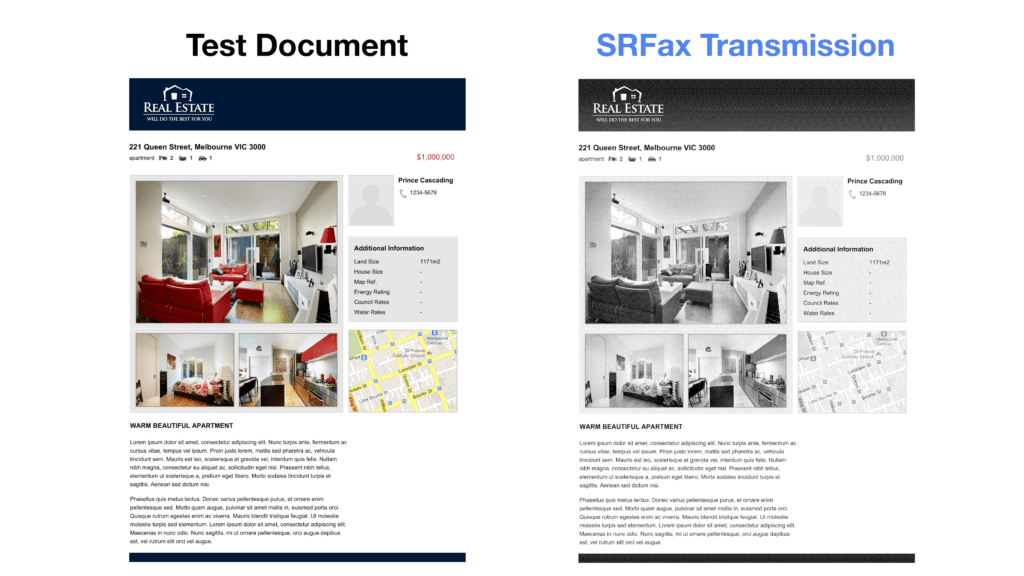
We can compare this against the same test fax from a similar popular fax service, such as Fax.Plus, and find that SRFax does transmit the page slightly better. Firstly, there’s more nuance and detail in the shading on the top banner. Then, the large photograph is more detailed, light, and clear. The map is also slightly more readable, with more blurring in the Fax.Plus page.
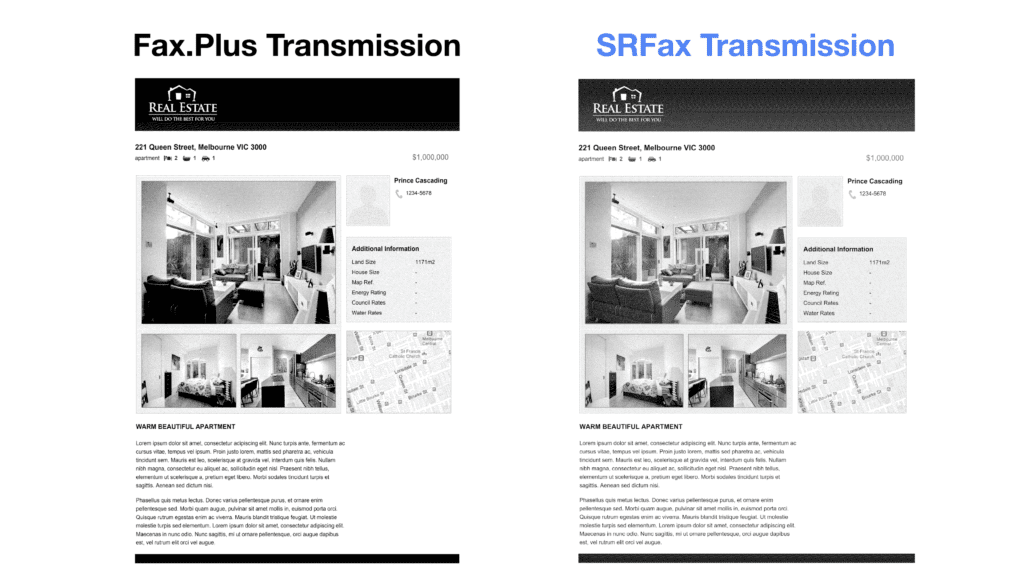
In our verdict, SRFax is a better quality fax than many other providers we’ve tested, including Fax.Plus. However, we can only give four stars in the quality score, because the first time we tried to send our test document, this happened:
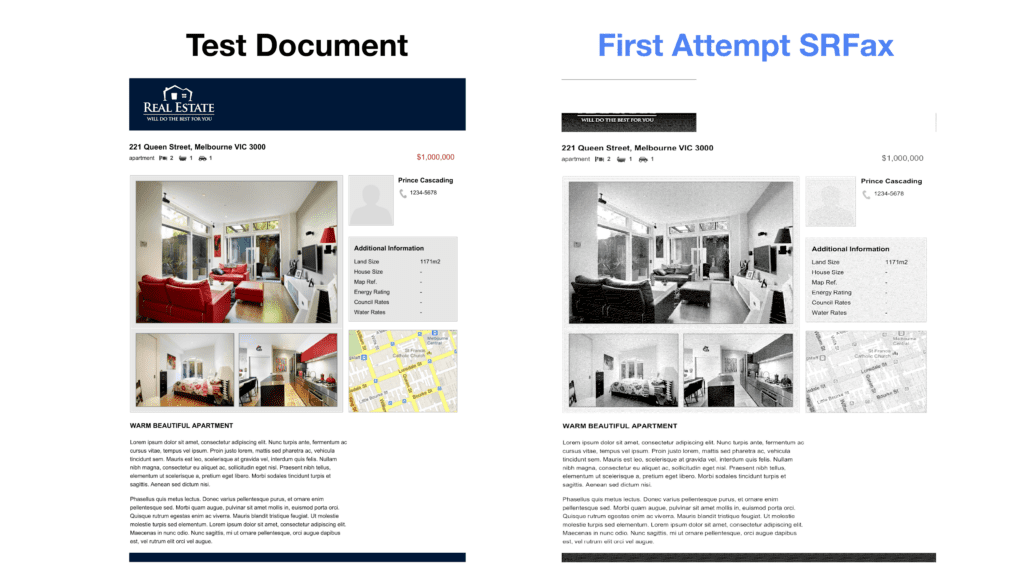
As can be seen above, the page did not transmit properly in our first test, and much of the page was lost. The files only transmitted properly once we separated the test files into one fax per page. This means we would advise all SRFax users to be very careful when they send faxes with more pages, and to preview the fax before sending. This ended up costing us extra pages to resend the test fax, so this could be a problem for users sending larger faxes.
User Experience
There are pros and cons to SRFax for the user experience, so first we will focus on the good things.
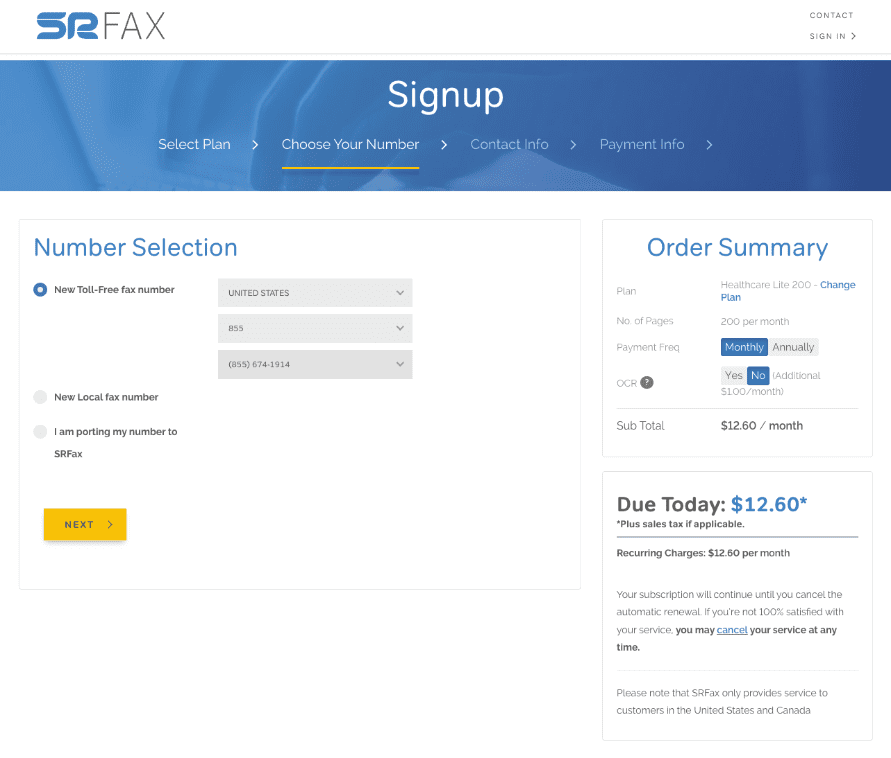
Firstly, signing up is a quick, easy and simple process. In about 1 minute, we were able to sign up, then choose our plan and our toll free fax number (or a local fax number).
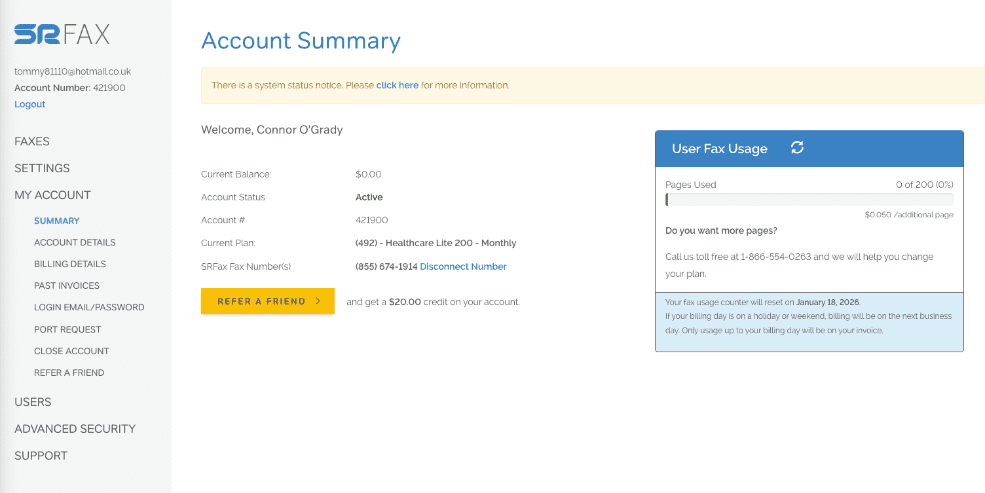
Once you are able to log on, the interface is very simple and easy to use. You will land on the ‘Account Summary’ page, where all options are clearly available on the sidebar – Faxes, Settings, Account, etc. It’s easy to navigate to send faxes, view incoming faxes, etc., and it’s even easy to see where to close your account in one click.
The interface is designed to make faxing as easy and simple as possible. Another nice touch is the fax usage view below, which shows users how many fax pages they have left to send.
SRFax also benefits from the fact that users can access it on any device, mobile or computer, and offers technical abilities such as fax broadcasting, which allow you to send to multiple recipients.
The user experience on SRFax has problems too. The first, and most obvious when you have used other services before, is that SRFax has barely any features for sending faxes.
Most online fax services allow the user to edit documents in a variety of ways, such as annotating, highlighting, e-signing, or cropping documents. Dropbox Fax, for instance, has totally free tools in-built to the web portal, which allow users to scribble and annotate on documents, and sign them, before sending.
SRFax does not allow users to do any of this – if you want to make changes to your documents, you must do it all in another app or program before sending it via SRFax. SRFax does not even give users the option of previewing fax pages whilst you are typing in the details of your fax. It is possible to preview a fax before sending it, however whilst you are preparing your fax, you cannot see the fax pages.
This is related to another huge drawback when you compare SRFax against its competition: the lack of a dedicated mobile app. Most online fax solutions include a mobile app, which allow users to take advantage of their smart phones to do things like scan documents using their phone camera, and easily rearrange or edit pages on their phones. With SRFax, you would have to download an additional, external scanning app in order to get the best use of your mobile device when faxing.
In addition to this, the interface of SRFax, whilst being easy to use, does look rather dated and clunky compared to other top services.
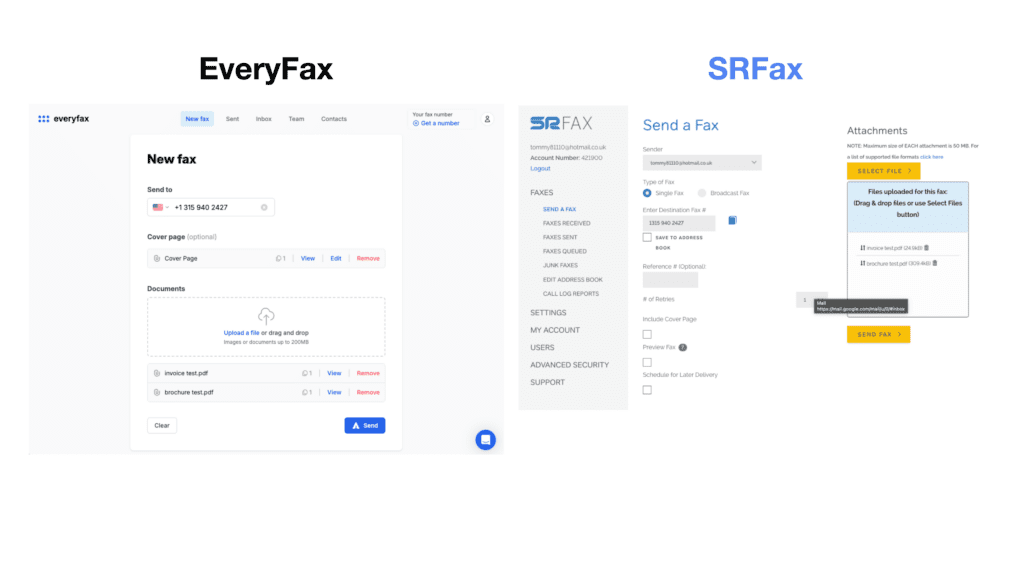
For example, in the ‘send fax’ pages below, EveryFax – a similar online fax service that’s HIPAA compliant and has attractive pricing – looks a lot simpler and easier to use than SRFax. The fax number is displayed in a proper format, and even has a flag to show which country code the number is for. Then below, the fax is clearly structured before the user presses send, and each page can be viewed easily. SRFax in comparison, looks clunky and complicated, and hard to understand.
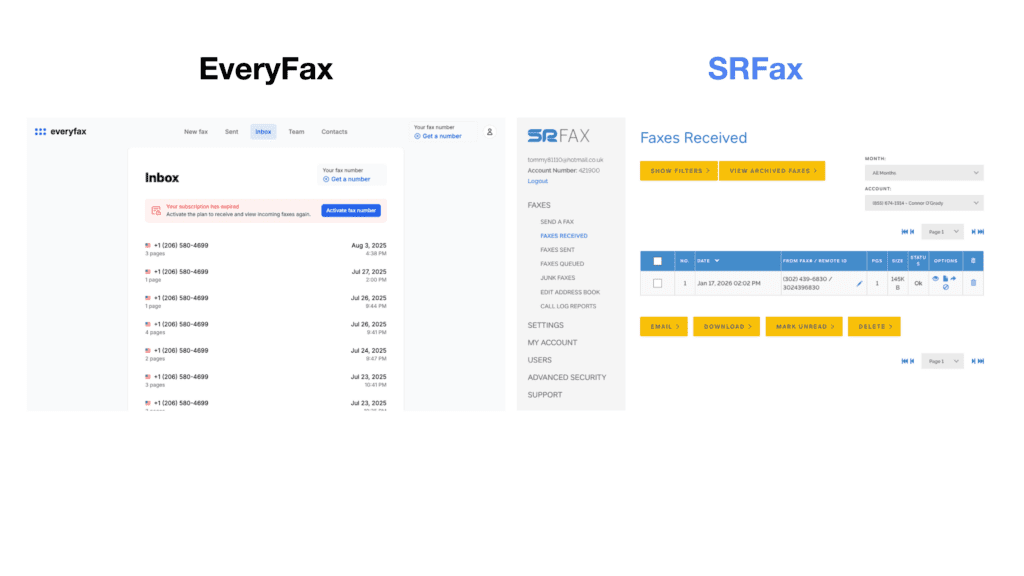
The same thing can be noticed when viewing your inbox – below, EveryFax looks very simple and easy to understand, the inbox is neatly presented. SRFax, on the other hand, looks very technical and overcomplicated, and much less user-friendly for the average person.
Of course, you can just use your email account to use SRFax, since it offers the email to fax feature. However, if we are comparing SRFax against other services, there is a clear difference in user experience which makes SRFax appear dated in comparison to other top providers.
There’s one more small thing which frustrated our experience of SRFax: when using it on computer, it constantly signs you out, even if you select ‘Remember on this device’ when logging in. Be prepared to type in your password many times!
Price
Price-wise, SRFax lets you choose from a large range of plans, catered to anybody from those who fax infrequently, to large corporations with heavy faxing needs. A big positive of SRFax is the price transparency – there’s no pushy tactics, it’s very clear what you are signing up for and easy to cancel, SRFax wants to give its customers the best value choice available to them.
On the bottom end, their Basic+ plan is on the pricey side compared with other fax providers – it’s slightly more expensive than the 200 monthly pages you can get from Fax.Plus or iFax, and much more expensive than Dropbox Fax. However, it is cheaper than MyFax or CocoFax. The healthcare Lite option, with HIPAA compliance, is however a rather cheap low-volume HIPAA compliant fax plan.
However, for 500 pages on a Standard Lite plan it’s a better price than iFax, Fax.Plus, eFax, CocoFax, Dropbox Fax, and many other services. You’d get a lower price with FaxBurner (which also offers a mobile app), however it’s overall a better quality service than FaxBurner, with much more security and customer support.
Once you get into the heavy / business faxing plans with HIPAA compliance, SRFax remains a slightly above average value price. For example, iFax’s 5,000 pages at the time of writing is $208.33 per month, whereas SRFax is much lower at $137.90. Dropbox Fax is also slightly more expensive, at $159.99 per month.
However, at the higher range there are also much more cost effective plans, such as EveryFax’s unlimited faxing business plan, which is even cheaper than 2,500 pages from SRFax.
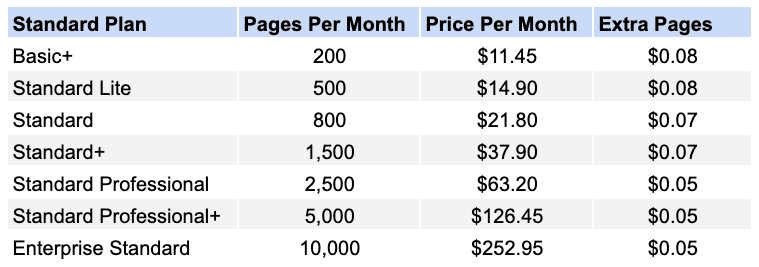
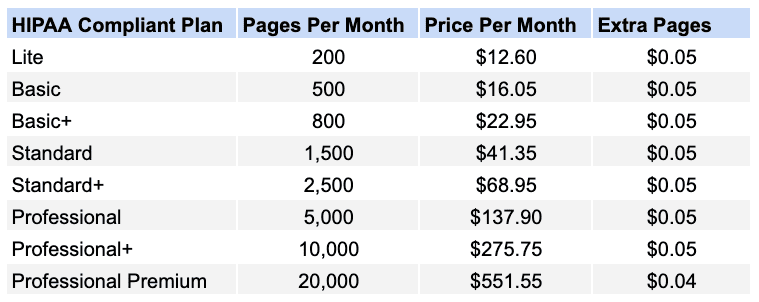
The takeaway from all this: if price is the only factor, then the SRFax cost is best for people with moderate faxing needs. If you have heavy or light faxing requirements, there may be better priced alternatives available.
Another important consideration on SRFax’s pricing, however, is the existence of additional charges. SRFax is quite transparent about most of these, however any potential customers should consider 3 main extra charges:
- Cover Page Charges. Whilst SRFax is quite good value at some level, there is one caveat to this: when sending our test faxes, we were charged 1 page for a cover page. Most other fax services do not do this, so with SRFax, you will use up your pages faster than on other services.
- International Faxing. SRFax is not like fax services such as Municorn Fax, or EveryFax, where faxing to other countries is included in your plan for free. SRFax’s website states that extra charges can be as high as $6.61 per page depending on where you send a fax, however for many western countries and US territories, it is only 5 cents per page.
- OCR Charges. If you want to use full-text searching in your faxes, you’ll have to pay an extra charge on your plan, which changes depending on your subscription. You can request this feature in a separate section when signing up.
These extra charges can add up, so it’s important to bear them in mind when choosing SRFax. There are, however, some ‘free’ standard features that SRFax includes which other fax services charge for, like the option to create a toll free number.
Security & Customer Support
SRFax is made primarily to support enterprises and healthcare solutions, as well as other regulated industries. As a result, it places a high priority in being safe and secure, following HIPAA procedures and offering a range of HIPAA and PHIPA compliant plans, with a quick and easy way for customers to request a business associate agreement.
It’s also incredibly easy to enable two factor authentication in the settings, and other nice features SRFax offers helps customers filter out junk faxes and other unwanted correspondence.
SRFax uses industry-leading 2048-bit end to end encryption for all data in transit and at rest, meaning anything from protected health information to payment information is safe and secure. Enhanced SSL encryption is available, with PGP keys and SPF enablement to ensure higher security email to fax access. There are more technical security features corporate customers may want to use, such as IP and subnet restrictions or role-based access controls if you have multiple users.
All of these features make SRFax a leading security fax service. What’s more, unlike many other services, there is a phone line to contact a team to a team of specialists based in BC, Canada, who can be phoned during business hours. Barring that, there is a toll free fax number you can contact, or a form on the website which can be completed to ask for help.
SRFax receives incredibly positive feedback from its enterprise customers and from individuals, with hundreds of positive testimonials available from across the web, including on Trustpilot, where it keeps an average 4.9/5 score.
There are other fax services which offer slightly more enhanced support features, however – such as Municorn Fax and EveryFax, which have live chat support and AI support for customers who need a quick answer to a quick question. iFax also has a 24/7 live chat and phone support. However, SRFax still stands out as an industry leader.
Verdict
SRFax is a well-priced option for moderate faxers, or those seeking to fax with a HIPAA compliant plan, as long as you watch out for the potential extra charges. For those with light or heavy faxing needs, there may be better value elsewhere, however SRFax does deliver a very high quality of fax, with strong security and customer support.
The user experience, on the other hand, is not as good as it is with other providers. The user interface is often quite dated and complicated, and the lack of a mobile app puts SRFax at a strong disadvantage for those who want to fax on-the-go, or use the power of their smart phone to quickly and easily create faxes.
We’d recommend SRFax as a solid option for anybody who faxes semi-regularly, and wants to benefit from a high security service.
SRFax Alternatives
SRFax is a strong HIPAA option, but it is worth weighing against the wider field — see our best online fax services roundup.
Municorn Fax covers the gap SRFax leaves on mobile — a proper iPhone and Android app, HIPAA compliance and unlimited faxing on every plan.
EveryFax is a HIPAA-compliant web and email-to-fax alternative with unlimited faxing, and a business plan that undercuts SRFax at higher volumes.
Fax.Plus is similar to SRFax in some respects, also offering HIPAA compliant enterprise plans with advanced technical features. Fax.Plus also allows users to access a mobile app, which can make faxing easier. The pricing of Fax.Plus however is less flexible and can be lower value than SRFax.
eFax competes with SRFax as a high-security, industry-trusted faxing solution. eFax’s pricing is not quite as good, but it does offer more services, such as natural language processing and AI, document signing, and enterprise cloud solutions.