RingCentral Fax – Fax Service Review

RingCentral has been the undisputed leader in cloud phone systems for a long time, including in online phone and online fax solutions.

There’s a reason for this – as a phone service provider RingCentral provides state-of-the-art features and an increasingly smart AI offering to businesses. However, as an online fax solution RingCentral is much more limited in features, usefulness and value – especially compared to other internet fax services.

Read on for our full review.

RingCentral Fax – Pros and Cons

Pros:

  • Simple and easy to use
  • Top-tier security & privacy
  • Useful, uncommon features
  • Can be used across any device or platform
  • Unbeaten integration with other apps and services

Cons:

  • Not a dedicated faxing-only service
  • No pricing flexibility, and limited value for most users
  • Lack of common built-in faxing features
  • Businesses only

About RingCentral

RingCentral has been an industry leader in the world of cloud-based business phone systems for the past decade, after it was founded in the late 1990s, and now has over $2.5 billion in annual revenue as a global service provider, and has been a Gartner ‘Magic Quadrant’ leader for 11 straight years.

RingCentral has always focused on computer users (initially Windows, but now supports all operating systems), and with faxing being a mainstay of business communications, RingCentral has been helping customers fax online for as long as it has been operating – supporting customers such as AT&T, Amazon, NBC, Toyota and thousands more.

With it’s flagship RingEX product, RingCentral offers features covering calling, SMS, video meetings & webinars, and online fax. In recent years however, RingCentral is pivoting their brand towards AI, positioning themselves as the AI business communications platform, and offering innovative products such as agentic AI solutions which can speak to customers, and helping businesses integrate features such as AI video collaboration into daily operations.


As an overall communications platform, RingCentral’s offering is incredibly advanced, and has a simple, clear pricing structure which allows customers to choose between Core, Advanced, and Ultra packages – and choose various add-ons on top of those. Faxing is included from the Advanced package onwards.

However, for faxing-only, RingCentral has just one package – Fax 3000. Fax 3000 is a carveout of RingEX which only includes the faxing capabilities, essentially turning your phone or computer into a fax machine, without the other phone services RingEX includes.

How To Send A Fax Online with RingCentral Fax

Getting started with RingCentral Fax is quick and easy. Head over to the Fax page on their website as a starting point, and select your plan to create an account.

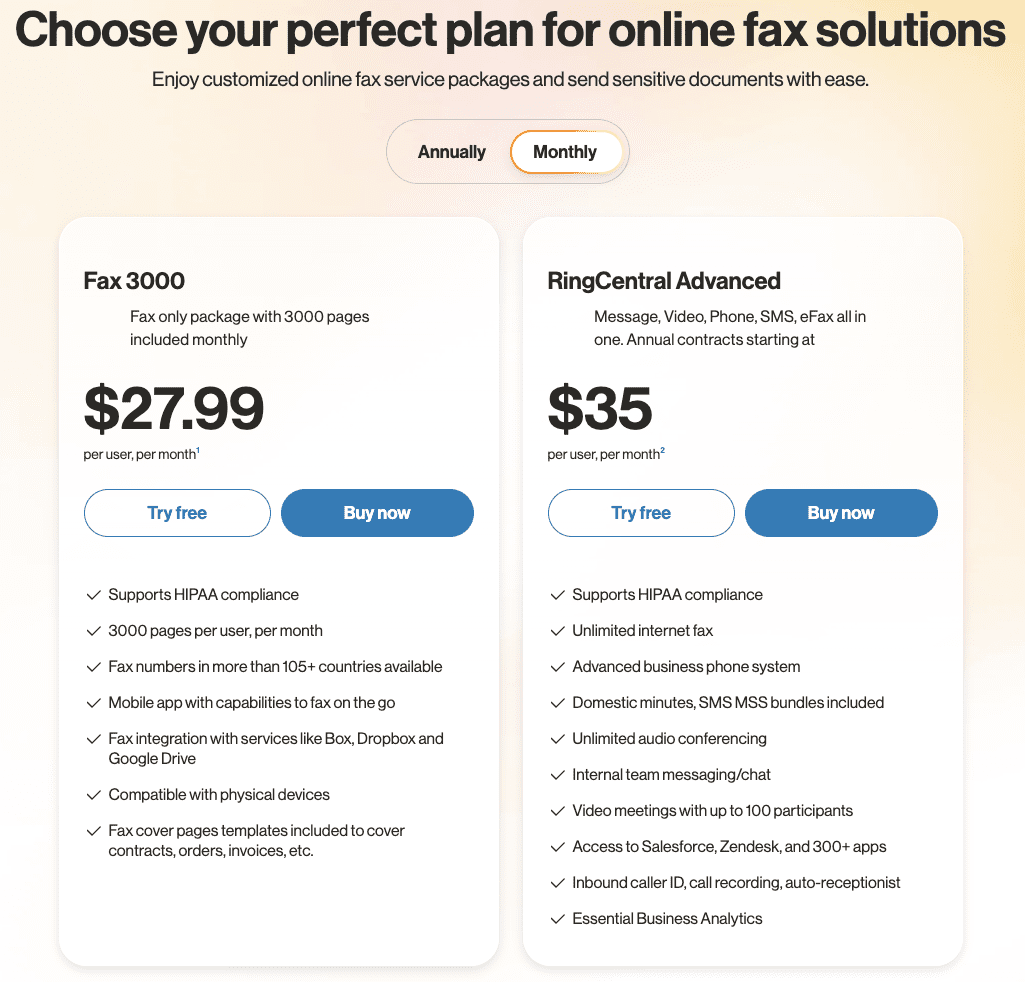
RingCentral pricing comparison showing Fax 3000 at $27.99 per user/month and RingCentral Advanced at $35 per user/month

Each option includes a helpful free trial period for 7 days, after which you will be charged for your annual or monthly fee, depending on the option you selected.

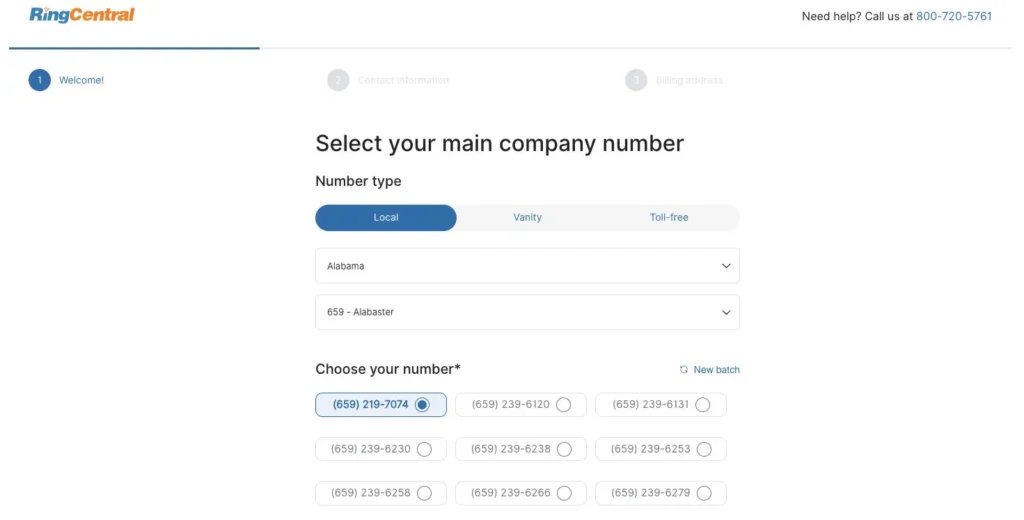
Once you have chosen a plan, you can set up your fax number. If you already have one, there is an option to keep that same number and move it to RingCentral, however if you want to create a new one, you can choose from hundreds of US area codes to set up a local number – or create a vanity or toll free fax number.

RingCentral sign-up step 1 showing the fax number selection screen with Local, Vanity, and Toll-free tabs and a state/area code picker

Following the creation of your fax/phone number, simply enter your payment details and other details needed by RingCentral.

Please note that at this point, you will need to provide details for your company or business in order to complete sign up – this includes details such as business address, number of employees, etc. RingCentral is sold exclusively as a business service – there is no consumer or individual plan, so you must be able to enter your company’s details otherwise you cannot complete the sign up process.

Once you’re all set up, you can access the RingCentral app via your web browser, which we will show below. Alternatively, there is an app for all major mobile devices and a Windows / Mac specific app which can be downloaded.

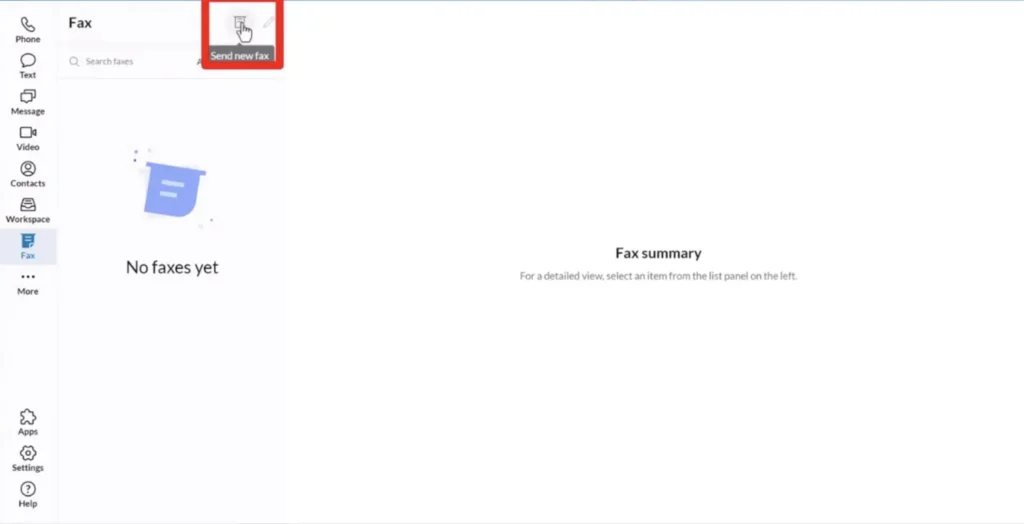
The fax module can be seen on the left-hand sidebar when using the Ringcentral app – simply click on ‘Fax’ to go to your faxes, and begin a new fax.

RingCentral app Fax module with the Send new fax button highlighted in the top toolbar

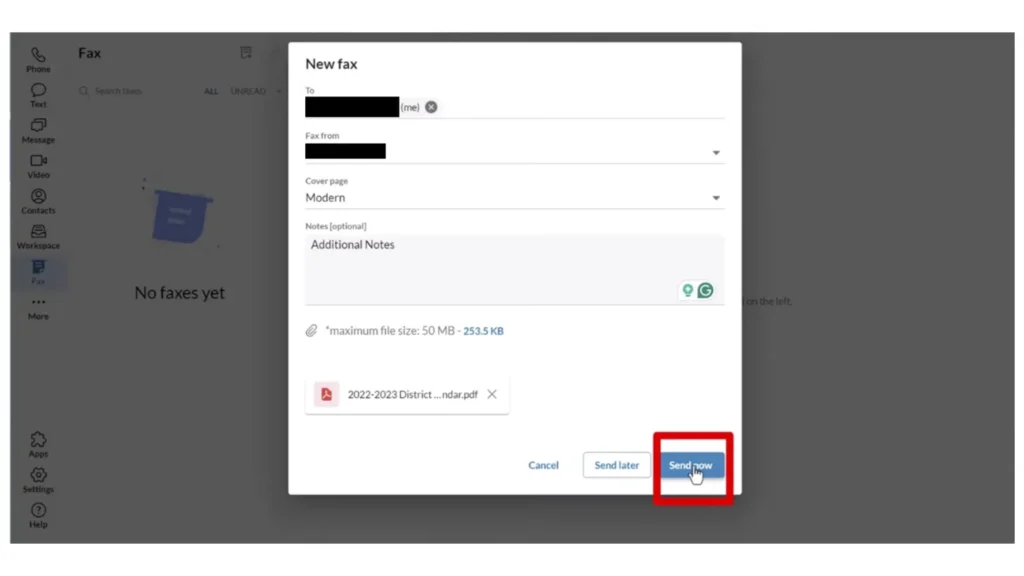
To send a fax, select new fax as above, and enter the details of the fax – you can input the recipient’s fax number here, attach files, and customise your cover page.

RingCentral new fax dialog with To, Fax from, Cover page, Notes and attachment fields, ending in Cancel, Send later, and Send now buttons

Once you have prepared your fax, entered your recipient’s fax number and attached your documents, your fax is ready to sent. You can ‘Send now’ or ‘Send later’ to schedule the fax for a later time.

Overall Score: Four Stars ★★★★☆

We’ve been testing RingCentral Fax as a fax-specific service, and over the course of this detailed review we will compare RingCentral to other online fax services which offer enterprise and business faxing. Our final verdict is four stars, however if three-and-a-half was possible, that’s what we’d go with instead.

Let’s start with why we like it.

RingCentral Fax is a solid online fax solution which offers good quality business faxing, with a variety of features and attractions that may raise eyebrows for large enterprises and small business owners alike.

Given the huge resources behind RingCentral, the security and privacy is airtight, including strong security features and compliance with all major regulatory requirements such as HIPAA, making RingCentral a good choice for businesses in regulated industries.

It’s also pretty easy to use RingCentral – there’s no tutorial required, the layout is simple enough, and the RingCentral mobile app makes using it easy wherever you are, and whichever device you have handy.

However, there’s also plenty of things that other fax services do better than RingCentral.

Firstly, the obvious problem is that RingCentral is not a fax-only service, and it doesn’t feel like one. When using the RingCentral platform, you constantly feel as if you’ve bought a tiny, shoe-horned feature of a larger product – all the other menus for phone, texting, video, etc are more prominent than the faxing interface, even though you can’t use any of them when on the Fax 3000 package. This makes using RingCentral quite confusing at times.

Secondly, related to the point above, there is absolutely no pricing flexibility with RingCentral Fax. There is only one package, and you can either buy it, or not buy it. This makes it very uncompetitive as a service for businesses who have specific faxing needs, and are looking for the best deal available.

Another big issue we found was usability – it’s true that RingCentral boasts a wide array of impressive features, however many of them aren’t specific to faxing, and some may only be relevant to a few types of clients. What’s more noticeable when using RingCentral is the features that it doesn’t have – basic things that people who send and receive faxes might want, such as document signing/editing, in-app scanning, etc – features almost every other fax app offers.


To review RingCentral, we’ve scored it across the following 4 major categories, giving you all the information you need for each:

  1. Quality and Features – How well does RingCentral work as a service, and does it offer lots of useful features?
  2. User Experience – How easy and convenient is RingCentral to use?
  3. Price – Is RingCentral a good deal, with flexible pricing options for different potential customers?
  4. Security and Customer Support – Is RingCentral a secure service which offers good customer support?

Quality and Features | ★★★★☆

Let’s start by looking at the actual fax service itself, and how good this is.

As a faxing service, fax quality is the foremost consideration, and RingCentral does a great job in converting all major document types into clear, readable faxes, and sends files (including text and images) with a high level of quality. RingCentral’s systems work quickly, and the average send time of our test faxes was slightly faster than other services we have tested.

RingCentral provides a great communication channel for a variety of faxing scenarios, for example: faxing to multiple people is very simple with its fax broadcasting service – you can fax up to 50 recipients at a time, you can use automatic fax scheduling, and batch faxes together to send at certain times.

What’s more, you can easily block unwanted faxes, based on factors such as area code, suspected junk/spam, and RingCentral are helpful in helping you identify and block such numbers to make sure that you don’t get your phone line clogged up by unwanted communication. These are all great options for a variety of business faxers.

There are other exceptional features which make RingCentral stand out – for example, vanity fax numbers. For a $30 one-time fee, you can create your own vanity fax number, allowing you to customise your fax number with words and letters, making it catchy and easy to remember. Other leading fax services such as Municorn Fax, eFax and Fax.Plus do not offer vanity numbers.

Another standout feature: if you have the Advanced package (which includes a phone line), you can use the same number for calling, text message services, and faxing – no separate numbers needed, making it even easier for your customers and clients to contact you.

There are some features business customers may expect to see which are not included with RingCentral, for example:

  • With RingCentral you can only store up to 200 messages online (for an unlimited time period)
  • For business faxing, you can use up to 20MB per document, but other services like eFax offer a large file sharing feature which allows users to send much larger files

However, most of the basics are there and some others which are rare to find. Overall, RingCentral’s quality and service offering is solid, and worthy of a 4-star score.

User Friendliness | ★★☆☆☆

User-friendliness and convenience is where, for us, RingCentral starts to fall down to the competition as a fax-only service. Let’s start with the positives:

  • Multi-device and multi-platform.
    You can use RingCentral from truly any device – there is a dedicated web app, apps for computer systems such as Windows and Mac, mobile apps for Android and iOS, and it includes email-to-fax and fax-to-email. With RingCentral, any device in your hand is a potential fax machine.
  • Widespread integration.
    RingCentral integrates with hundreds of critical business systems, for example it’s incredibly easy to integrate RingCentral with Microsoft Teams, and most other Microsoft programs integrate with RingCentral app, to the point where you will be able to simply click the RingCentral button inside Word, and it will prepare your current document to be quickly faxed. Thousands of businesses choose RingCentral because it has hundreds of integrated solutions for service providers, integrations with obscure and uncommonly-used systems which most fax-only providers don’t match.
  • Cover Page Customisation
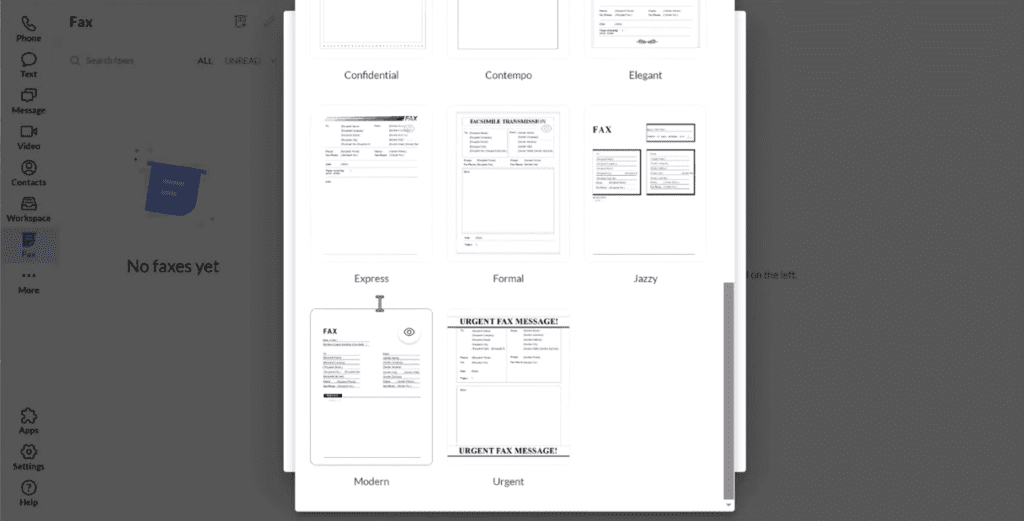
    RingCentral’s standard cover page customisation is very good, allowing users to quickly preview from dozens of choices of cover page.
RingCentral fax cover page template gallery showing eight built-in designs: Confidential, Contempo, Elegant, Express, Formal, Jazzy, Modern, and Urgent
  • Notifications
    You get instant messaging notifications on the status of all faxes, and you can choose between SMS, email or in-app alerts for this.


Despite these positives, using RingCentral is overall a disappointing and sometimes frustrating experience when you’ve tested a variety of other online fax services. Let’s go through each major problem one-by-one.

Firstly, the biggest problem with using RingCentral is that you are using a cross-use interface for a single use-case. RingCentral doesn’t provide a faxing app, it provides a phone, video, SMS and faxing all-in-one app, and expects you to figure out how to navigate around the other parts by yourself, without removing the irrelevant parts from your user experience.

This plays out in all sorts of ways. For example, when you sign up you have to create a PIN for accessing voicemails – however, if you’re a fax only customer, you will never need to do this, but you still need to create the voicemail PIN. Another thing users will notice is the welcome/landing pages when you access the app, which mostly have nothing to do with faxing.

There’s also the side menu, which, if you’re a faxing only customer, should only have one button available (besides settings): Fax. However, you can still navigate to the useless video conferencing, calling, messaging and meetings menus. This adds unnecessary noise to the user experience.

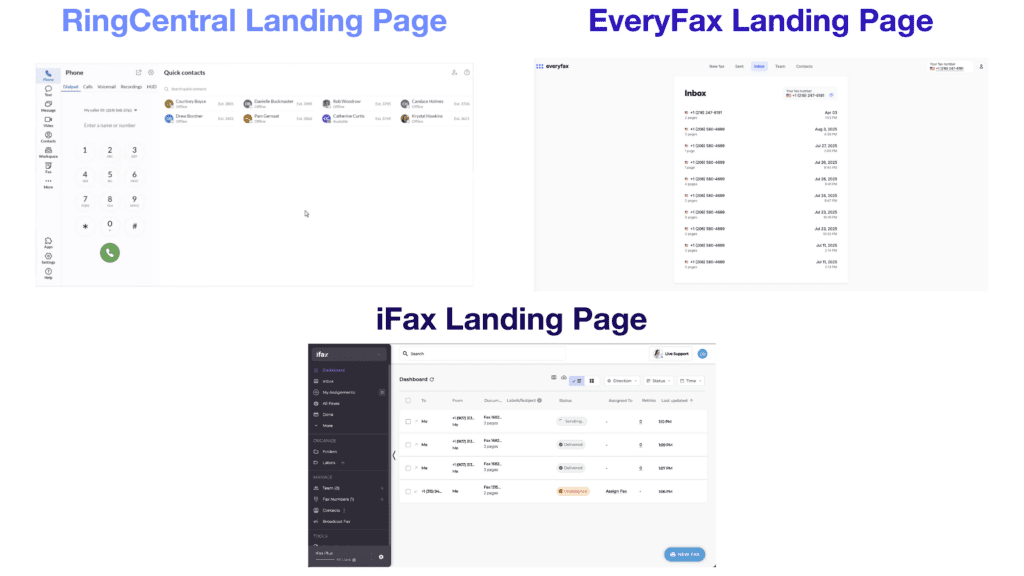
Using RingCentral just to fax is a constant reminder that you are using one small, and less important feature of a larger service provider. With a fax-focused service like EveryFax or iFax on the other hand, every option you see on your screen is clear and relevant to faxing – making the user experience simpler and more straightforward.

You can see this comparison below just from the landing pages – EveryFax and iFax are intentional and everything is relevant to faxing, whereas RingCentral shows you a variety of other RingCentral products which are irrelevant to a fax-only user.

Logged-in app dashboards for RingCentral, EveryFax, and iFax compared side by side, showing fax-focused interfaces versus RingCentral's multi-product menu

This comes with other problems – another huge one being that you cannot organise and keep a good view of your faxes with RingCentral. Take the example above – with EveryFax and iFax, you can quickly and easily view your inbound or outbound faxes. With iFax, you can create folders and labels to organise faxes – but you can’t do any of this with RingCentral, making it harder to track your correspondence if you’re a high-volume faxer.

Then there’s other basic user experience features which are lacking with RingCentral, but are included in other apps such as Fax.Plus or DropBox Fax.

For example, in-app scanning is included in Fax.Plus and Municorn’s Fax App, and allows users to quickly use their devices camera to scan a document for faxing. RingCentral does not offer this capability, meaning that in any scenario where you have a document you want to quickly fax, you must use a third-party app or scanner, and then send the scanned file to your device for faxing – this adds more time and effort.

Another such example is document editing or signing – something offered by DropBox Fax, another leading business fax provider. RingCentral does not allow you to edit documents in any way before sending, which means another case of extra time and effort required in this situation.

An even more basic example is that you cannot preview a fax before you send it with RingCentral. As someone who loves doing a ‘final check’ before sending anything important, this is a big issue for me personally. Faxing is often used for important file transmission – medical, financial, legal… so the lack of a preview option (RingCentral’s documented send flow goes straight from attaching files to ‘Send now’) will cause issues for many customers.

Overall, the faxing feature of RingCentral feels like mostly an afterthought. When you’re using a dedicated faxing service like Municorn Fax, iFax or DropBox Fax, there are other features there which remind you that you’re using a faxing solution – none of those features are present with RingCentral, which results in a frustrating user experience.

Price | ★★★★☆

If you’ve tested and used other faxing services, one of the prominent things that jumps out with RingCentral is the absolute lack of pricing flexibility for faxing. There is only one option available: Fax 3000.

You can also get unlimited faxing services if you purchase the comprehensive RingEX Advanced package or higher, which includes phone systems, SMS bundles, audio and video meetings, essential business analytics and more, but the price is higher because of the inclusion of those things. Moving to an even higher package with RingCentral has no impact on the faxing services offered – Advanced is as good as it gets for faxing.

RingCentral pricing comparison showing Fax 3000 at $27.99 per user/month and RingCentral Advanced at $35 per user/month

Fax 3000 includes 3,000 fax pages per user per month, and costs $27.99 per user per month. Included is the ability to fax to over 105 countries, a mobile app and email-to-fax, and all the faxing features RingCentral offers, including HIPAA compliance support.

Below is a comparison view of the mid-level packages for other major services. Only Municorn Fax matches the value on paper, despite being more per month, it includes 5 users instead of 1 (so a much lower price per user) and offers unlimited faxing, rather than a 3,000 page limit.

RingCentral EveryFax iFax Fax.Plus eFax
Price (monthly) $27.99 $37.99 $39.99 $34.99 $49.99
Pages 3,000 Unlimited 1,000 1,000 1,000
HIPAA Yes Yes Yes No Yes
Intl Faxing Included Included Extra Cost Extra Cost Extra Cost
Max Users 1 5 1 1 5

Overall, Fax 3000 isn’t a bad deal compared to some other leading providers. Whilst iFax and Fax.Plus both have much better user experiences and more useful features, from a price-only perspective they both come in considerably worse than RingCentral’s Fax 3000 package.

A key strength of RingCentral (and Municorn Fax) is that when you are using their unlimited packages, there are truly no extra or hidden charges. All other leading services will incur extra costs when faxing internationally, or when you require additional users.

RingCentral’s Advanced package offers unlimited faxing, as well as a variety of other phone, SMS, video and audio services for $35 per user/month with monthly billing, or $25 with annual billing, however it’s worth noting again that this is per user, so Municorn Fax and even eFax would work out cheaper for multiple users, depending on the volume of faxes being sent each month.

Overall, RingCentral’s Fax 3000 compares quite favorably price-wise against other fax solutions, however it’s worth nothing that you cannot customise your package at all. This puts it at a severe disadvantage to services that include a clear transparent tool on their website which allow users to customise their own offering – such as iFax and DropBox Fax. DropBox Fax in particular has over a dozen subscriptions to choose from, giving huge flexibility to businesses.

Security and Customer Support | ★★★★☆

RingCentral, being a huge and highly successful service provider, has a strong security apparatus and an airtight system set up to keep customers’ data safe.

RingCentral comes with all the standard security features you’d expect from a top tier service: encryption for data at rest and in transit, TLS encryption and E2EE via message layer security – more than the average email provider offers.

RingCentral also goes above and beyond to issue whitepapers on topics such as trust in AI and data security, and having read these, its clear that they are constantly thinking about security and how they can improve.

The culture of safety and security is evident from the first time you sign up – I’ve never seen stricter strong password requirements for a fax service, and there’s also a mandatory PIN and security question – far more than the average fax service demands.

RingCentral is built on a highly secure platform, which comes with a variety of security and compliance certifications – such as HIPAA, HITRUST, AICPA, GDPR and more – again this is more than most other online fax services can say for themselves.

It’s obvious why over 500,000 businesses, including 22,000 healthcare organisations, use RingCentral – it’s very secure.

On top of this, the customer service is mostly positive. There is a 24/7 contact center where you can contact a sales rep or account manager if you’re ever struggling, on top of a wide variety of AI support, FAQs, videos and other community channels available online for those who need help.

Customer reviews on third-party platforms tell a more mixed story. RingCentral’s Trustpilot score sits at 1.9/5 at the time of writing, with most complaints clustering around customer service responsiveness and occasional service outages. Trustpilot skews toward unhappy customers in any category, so weight the score accordingly – but the volume and consistency of complaints is worth knowing about before committing to a long-term contract.

Summary

There’s no point in talking about RingCentral without first stressing that it is for businesses only – and therefore business faxing is the focus of this review. From this perspective, RingCentral does a lot of things right.

Particularly, features which businesses will love include vanity numbers, all-in-one fax/phone/text numbers, and the massive security and compliance environment around RingCentral. It’s also not a bad option price-wise if you’re confident you will use under 3,000 pages per month, or if you want to go with RingEX Advanced and use their phone/video services too.

RingCentral Fax, as a faxing-only option however, often falls short to its competitors in important ways:

  • With Municorn Fax, you get unlimited faxing across multiple users (rather than 3,000 pages on a single user) and a fax-focused interface that doesn’t surface unrelated phone, video and messaging features.
  • With iFax, you get features specifically built for high-volume business faxing, like folder organisation and document tagging.
  • With eFax, you get more pricing flexibility (monthly and annual options), the ability to handle very large files via FuseMail, and a long track record in regulated industries – though the user interface lags behind newer services.
  • With Fax.Plus or DropBox Fax, you get more flexible pricing tiers and useful daily features RingCentral lacks – like document editing and electronic signatures.

The main problem, however, with RingCentral Fax as a faxing-only solution is that, well, it isn’t a faxing-only solution. This makes the user experience frustrating, longer and more inconvenient than it would be when using any of the alternatives listed above.

RingCentral Fax is, then, only for a certain type of business – for a business which needs an overall cloud phone system which includes faxing, it is outstanding value. If a business just needs a faxing solution, RingCentral has limited itself to a very narrow customer base through its pricing mechanism and its lack of features.