
Quick answer: Municorn Fax is our top iPhone pick (4.6/5) — unlimited pages on one subscription, the best fax quality we tested, and a 4.8 App Store rating from 370,000+ reviews. Genius Fax is the best simple option, FaxBurner has the most useful free tier (5 send / 25 receive pages a month), and MyFax is the cheapest way to own a fax number. iFax and eFax are capable but pricey and aimed more at businesses. See our best online fax services roundup for every platform.
This list was updated in December 2025
Sending and receiving faxes is now easier than ever before, thanks to the exploding popularity of fax apps—each offering to turn your iPhone into a fax machine! But with so many options, how do you know which one to choose? To answer this question, we’ve tried 7 of the most popular iPhone fax apps in the world and reviewed each one. Here are our favorite iPhone fax apps to use in 2026, and here’s how we rate each one.
Looking for a step-by-step guide instead? See How to Fax from iPhone.
How We Reviewed Each App
We have downloaded and used each of the apps on an iPhone 16 Pro Max, an iPad, and an older iPhone SE. This is to give you a reflection of how these fax apps work on newer and older iPhones.
Many people need to fax documents regularly for things like medical or insurance information, or financial reasons—after all, faxed signatures are still much more legally accepted than e-signatures. Others may fax only occasionally – maybe even once or twice a year. Other people may rely on faxing for their businesses, needing unlimited faxes and a wider range of fax services. We have considered every use case, and used 5 different categories, scoring each app from 1 to 5 in every category, then averaging those into an overall rating out of 5.
Performance
If the app doesn’t work properly, then nothing else matters, and there is no point reading on, right? So, the first category is performance – the fax app has to work properly, it has to send and receive faxes, work with multiple file formats, send good-quality documents and provide a range of other useful features that work.
User-Friendliness
Sending a fax should be as easy as sending an email, or doing anything else on your iPhone – it should be simple to understand and use the features on offer, for all types of users.
Pricing
There are lots of reasons someone might use a fax app for iPhone. An online fax service must cater to as many possible customers as possible, and offer a good deal. We looked for flexible pricing options, page limitations, a free trial option, whether there was a monthly fee or setup fee, to judge whether the fax app had competitive pricing options for every user.
Support
We looked at the companies behind each fax app to judge whether or not they provide good customer support and reliable services. Faxing is stressful enough sometimes, and usually involves sending important and sensitive documents – you want to make sure yours are in safe hands. We also looked at other factors, such as data security and privacy features, when scoring each app.
Customer Feedback
Don’t just take it from us. Each of these apps is a popular option on the app store, with thousands of reviews for each app – we take a look at the average score each app gets, the problems people report experiencing, and if the app developer gives a satisfying response to reviews.
Our Final Rankings
All seven apps we tested, ranked by overall score. Tap a name to jump to its review.
| App | Best for | Price | App Store | Our score |
|---|---|---|---|---|
| Municorn Fax AppTop Pick | Best overall | Unlimited subscription (free trial) | 4.8/5 | 4.6/5 |
| Genius Faxby The Grizzly Labs | Best simple option | Number subscription + per-page credits | 4.9/5 | 4.2/5 |
| iFaxby Crowded Road | Best features (business) | From $14.99/mo (receiving from $29.99) | 4.5/5 | 4.2/5 |
| Fax.Plusby Alohi | Best scanning & security | Monthly/annual tiers (no unlimited) | 4.7/5 | 4.0/5 |
| FaxBurnerby Networx | Best free tier | Free tier (5 send / 25 receive); plans from $14.95/mo | 4.9/5 | 3.8/5 |
| eFaxby j2 Cloud Services | Best for large business | ~150 pages/mo “Pro”; corporate on request | 4.7/5 | 3.8/5 |
| MyFaxby Consensus Cloud Solutions | Cheapest number | From $12/mo ($5 first month) | 4.7/5 | 3.2/5 |
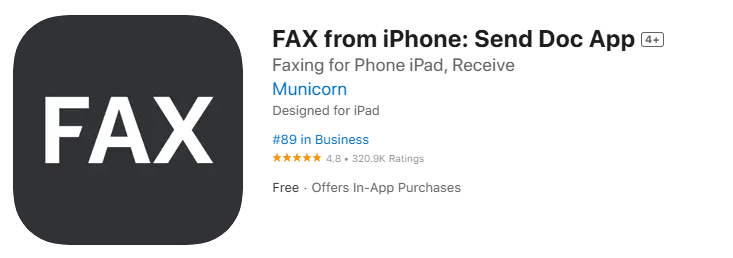
1st Municorn Fax App
Performance — 5/5
Municorn’s FAX from iPhone app does everything you could ever need it to do, and many things you wouldn’t even know you needed. Firstly, the quality of the sent and received faxes with this app was the highest quality – scanning documents and combining multiple documents together, even when using multiple file formats, looked perfect every time. You can pull documents from iCloud, Google drive, or any other app on your iPhone and include it within a fax using this app.
Getting a dedicated fax number which works anywhere in the world is a major benefit to this app. Sending faxes only took around a minute, and the status of each fax we sent and received updated instantly from “pending” to “delivered” as soon as it came through on the other device.
Overall, there was no better quality of fax on this list – even against other top services.
User-Friendliness — 4/5
The layout is simple and easy to understand – and is almost unrecognisable from most major email apps. This app is intuitive – it feels like you’ve used it before, and there wasn’t a moment of confusion from the second we installed it. Plus, it has a dark mode! The only downside we found is that it doesn’t offer VR/Apple Watch support yet, or desktop web support. This isn’t important to everyone, but other fax apps for iPhone do offer this.
Pricing — 4/5
There is a simple pricing structure on offer, and every package includes truly unlimited pages – a real advantage over apps that cap your pages or charge you per page. After a free trial you can subscribe weekly, monthly, or annually. It’s worth being upfront about the trade-off, though: this is a subscription-only app, with no pay-per-fax or one-off option, so it works out best value if you fax regularly rather than once or twice a year. For very occasional faxing, a free tier like FaxBurner’s may suit you better – but if you fax often, the unlimited-page subscription is one of the strongest-value deals on this list.
Support — 5/5
Municorn set themselves apart on customer support. Within the app is a very helpful FAQs section, with every possible question you could think of. If that fails, you can contact the support bot, or a live chat with a member of the support team, directly from the app, a feature none of the other apps had. Municorn has a wide range of productivity and business apps on the app store beyond the fax app – and thus they have a very established dedicated service team on hand for their customers across all apps.
This is also one of the top apps we looked at for security and data privacy – with secure servers and only tracking 5 data points of its users, with no intrusive tracking. You’re also covered if you lose your iPhone – you can request your full account history and get access to a fully encrypted archive of your faxes.
Customer Feedback — 5/5
Municorn’s app has an average rating of 4.8/5, with 370,000+ reviews – the largest number of reviews of all the apps on this list. It’s regularly in the Top 50 apps of the Business section of the App Store for a reason – it’s the premier, reliable fax app for iPhone. The numbers don’t lie!
2nd Genius Fax, by The Grizzly Labs
Performance — 3/5
Genius Fax is a well-performing fax app which nails the basics – our faxes were sent in just a few minutes, and it takes very little time to set up your own fax number. However, Genius Fax does suffer from a lack of features and advanced functionality – with no external cloud storage integration, no page editing, very basic cover page options, and difficulty to rearrange the pages on larger faxes. This is a great app for short and basic faxes – for heavier lifts, you might want to look elsewhere.
User-Friendliness — 5/5
This is a really easy-to-use app which doesn’t overcomplicate things. The app doesn’t contain clear menus across a bottom ribbon, like most apps do. Instead, there is essentially one menu screen, where you can choose to send a new fax or view your received/sent faxes – it’s very simple and it works well. At the bottom of the screen, you can clearly see your pages balance and your fax number. Everything is on one page, and it made this app stand out in simplicity.
Pricing — 4/5
We were conflicted on pricing for Genius Fax – the model requires you to pay a monthly or annual fee to keep your own fax number, and then an additional price for “credits”, which enable you to send faxes – you pay for one page at a time, or can buy them in a bundle. If you only want to send OR receive faxes, this is a great model that provides flexibility, however most people want to do both, which makes Genius slightly more expensive for them than other options.
Support — 4/5
We love Genius Fax because the app doesn’t directly track your data at all – not even just your in-app usage. This is a top app for privacy. They also provide several helpful video tutorials for the basics. However, there is a lack of support features such as live chat, or even the option to send a help query to the team.
Customer Feedback — 5/5
Genius Fax has a very impressive 4.9 average from tens of thousands of reviews – the team often responds to feedback and addresses customer challenges, and it has a large community forum online for customers to help each other. They get the top score for being trusted by so many people.
3rd iFax App by Crowded Road
Performance — 5/5
iFax is packed full of helpful features on its web faxing interface, but the iPhone app in comparison has very few of those features. You can do the basics, like simple document editing and signatures, however anything more advanced will require you to use its web platform – this isn’t a feature-rich faxing app, but it covers the basics well.
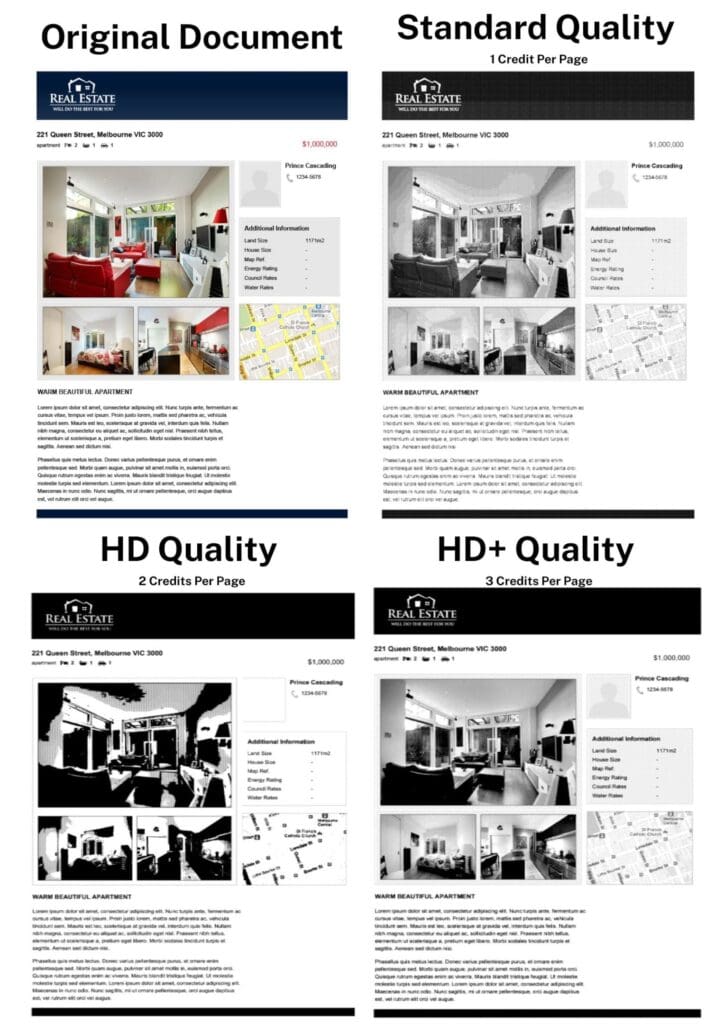
As for faxing quality, you can choose a Standard, an HD, or an HD+ transmission quality, each costing 1, 2 or 3 credits respectively per page. Strangely, we found the first option, Standard, to be the best one, with the others very disappointing based on the price – especially HD. The Standard fax will convey images clearly and with sharpness, however it is still lower quality than other competitors on this list. iFax seems to struggle with images in particular – we had no complaints on the quality of our test documents which were all text. The transmission time is also very fast – about 1 minute per page.
User-Friendliness — 5/5
Once again, iFax gets the top grade for user-friendliness. The design is simple, and all options are clearly signposted with bright and colourful buttons. We particularly liked how custom folders make storing your sent and received faxes easier, and how you can sort all your drafts by date, name or status, making it easier to pick up faxes you haven’t sent yet.
Whilst you can’t do anywhere near as much on the iPhone app as you can on iFax’s web app, it’s still a great faxing app compared to most of the competition.
Pricing — 3/5
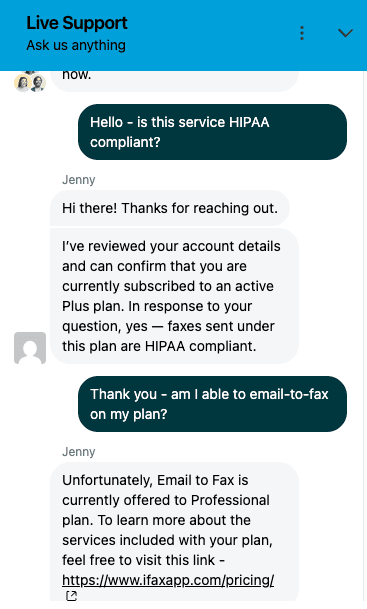
iFax is let down by the pricing, especially if you’re only using it on the iPhone – you’ll be paying a high price for something which a lot of other apps do just as well, but cheaper. Overall it’s priced like a premium service – the Basic plan is $14.99 per month, but you can’t even get a fax number or receive faxes at this price – to do that you’ll need the Plus package, at $29.99 per month. Even then, you won’t get email-to-fax until you pay another $10 per month on their Pro package at $39.99 per month.
Basic things like email-to-fax are covered as standard with other apps, so the way iFax locks key features behind higher paywalls brings it down for pricing.
Support — 4/5
There’s nothing to complain about for support – iFax is run by a good team, the in-app user guide has so many helpful FAQs, and the team boasts an average response time of under 9 hours to help requests – some other apps take days to get back to you. There’s a live-chat function that uses AI to help users, plus you can even book a welcome call with a support staff member to show you how to use iFax when you sign up.
Customer Feedback — 4/5
Unfortunately, whilst we really like this app, it doesn’t have the best reviews out of the apps we’ve looked at. A 4.5 average rating makes this one of the lowest customer-rated apps on the list. We’ve looked at negative reviews, which often complain about a misleading free trial, technical problems, and trouble cancelling subscriptions.
4th Fax.Plus, by Alohi
Performance — 5/5
Fax.Plus supports a huge variety of sources and document types or scans, and sends high-quality faxes from web, email-to-fax, or the iPhone app. There can be no complaints on quality at all – faxes are clear and readable, with images generally coming through well (albeit not as good as Municorn Fax). It has a number of other very nice features too – like the ability to schedule when a fax will send, or email recipients PDFs of the fax.
The in-app scanner is very smart and has the best document detection and automatic border cropping out of all the apps we looked at, with very good brightness and contrast configuration. We also particularly enjoyed the cover sheet options with Fax.Plus, which let you customise your faxes to a higher degree.
Our 2-page test fax with a cover sheet took 4 minutes to send – this is a fast time compared to most apps. This is a top quality app that works well.
User-Friendliness — 4/5
The iPhone app is visually great, simple and intuitive to use with a clear sign-up and fax-number creation process, making it easy to choose exactly where you want your local fax number to be based. The design is pretty clean and functional – you’ll have no problem using this app, even though it isn’t quite as shiny and ‘polished’ as apps like Municorn’s or the iFax app.
The real issue with Fax.Plus is a workflow one. Alohi, the app’s creator, offers scanning and signing services too – which are pretty essential features for a fax app – however both of these functions are only usable through other apps – Sign.Plus and Scan.Plus. This means in order to get the full Fax.Plus experience, you need to download three different apps, and switch between them while you create your fax. It’s incredibly frustrating to do this, when other fax apps can get the same things done all inside one app.
Fax.Plus also only supports 4 languages – by far the lowest on this list.
Pricing — 3/5
This app offers four different pricing packages, from Basic all the way through to Enterprise users, which give flexibility to any type of faxer. You can get a monthly subscription, or save ~20% with an annual subscription – there’s no weekly option.
There’s an issue we found whereby page credits are used even for cover pages – many other fax services don’t charge users for cover pages, so this puts Fax.Plus below other similar apps. You will also get charged more credits for fax pages that take over 1 minute to send – this is through no fault of the user, so we felt this was unfair.
Many features are locked behind higher tiered subscriptions – such as the ability to sign documents (via their external Sign.Plus app), or benefit from HIPAA compliance if you’re a small business (only available in the $100 per month Enterprise plan).
There is no “unlimited faxes” option, but overall despite the faults above, Fax.Plus is far from the worst deal in online faxing – given the quality and support you get from Alohi.
Support — 4/5
This app tracks none of your personal data – making it a top choice for privacy. It’s also very secure, offering touch ID and 2-factor authentication to make your faxes safer. All the key basics for security are there, including encryption, GDPR compliance (it’s a Swiss company), and advanced features like ISO27001 compliance, access logging, and HIPAA compliance all available.
There is a dedicated email support team to help – however it’s not as instant as Municorn’s app, which has live chat feature and a chat bot, giving you quicker help. The website, however, is incredibly useful for quick queries – we found the network status page particularly helpful for understanding if there is ever an outage in the fax systems Alohi uses.
Customer Feedback — 4/5
With an average rating of 4.7 across thousands of reviews, people are generally satisfied with this app – it’s a popular service used by individuals and businesses, however there are other apps with higher scores and more reviews.
5th FaxBurner, by Networx
Performance — 3/5
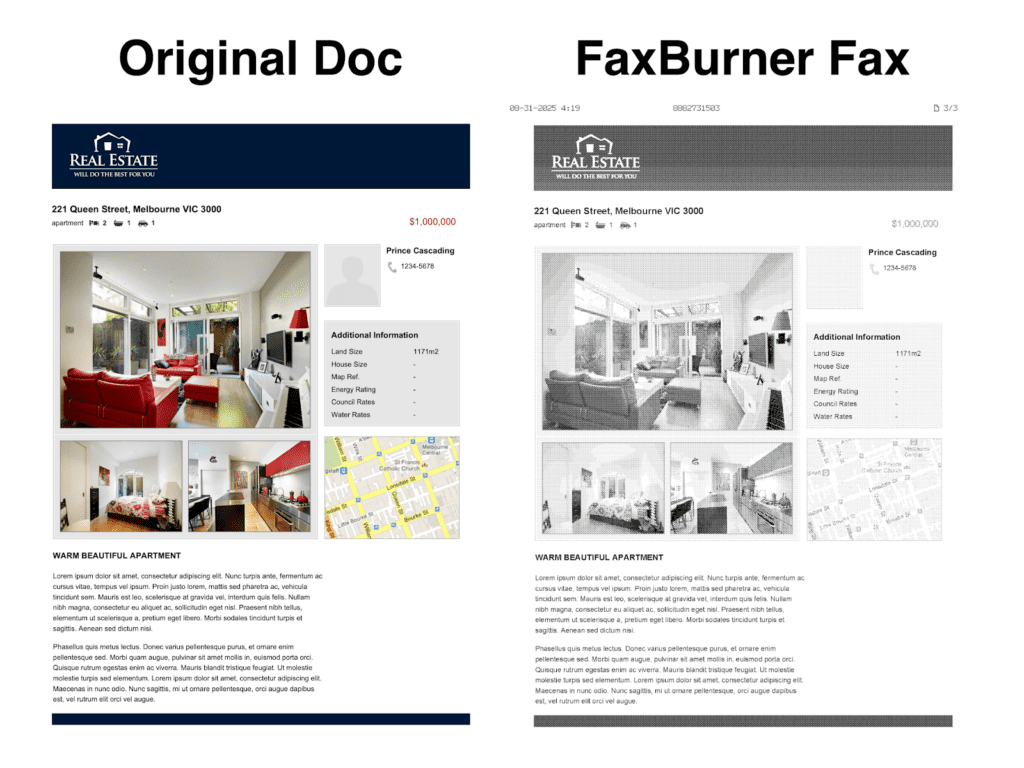
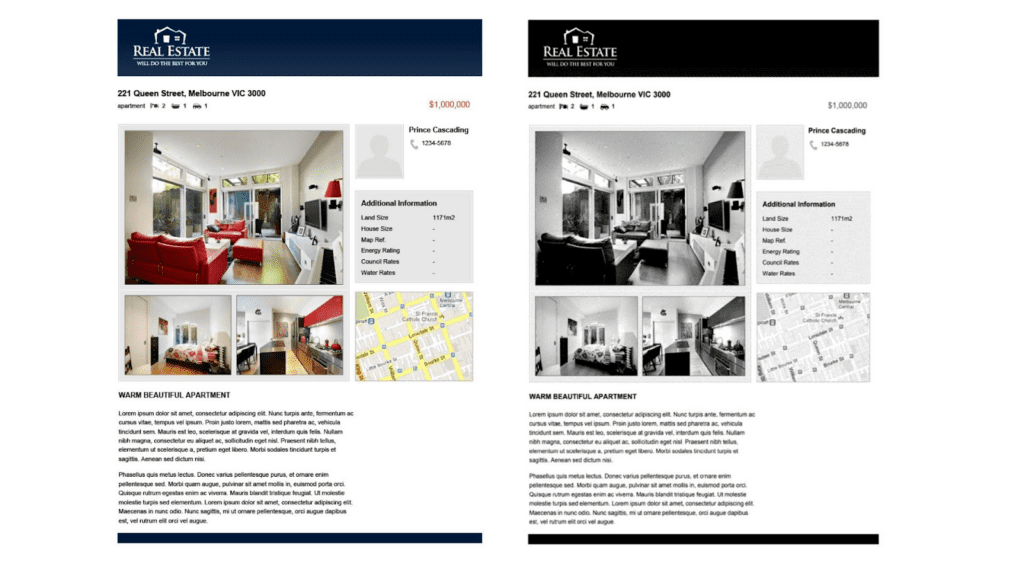
FaxBurner’s fax quality is average at best – operating at an industry-standard 204×196 dpi resolution, it will give you good quality text documents like letters and forms, but don’t expect detailed pictures or images to transmit perfectly – our test had a few lost details in the images (you can see this in the map and person icon in our test), and we saw color and shading not quite transmitting as well as other apps.
Still, it’s good enough to rely on for most things, and our 3-page fax took around 5 minutes to send, which is quite an average speed.
User-Friendliness — 4/5
FaxBurner is a very basic app for iPhone – visually it feels like it hasn’t been refreshed in around 10 years, but everything works well and is easy to do. FaxBurner recommends its iPhone app, but offers email-to-fax with all subscriptions too, in case you’d rather use your email app.
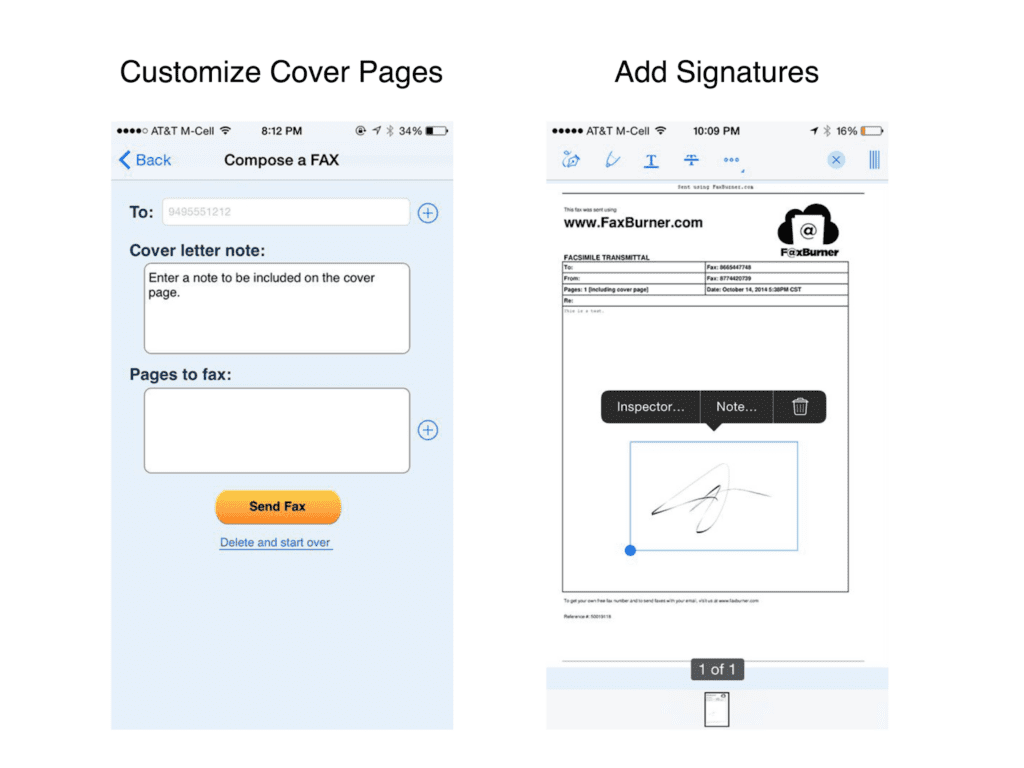
You can easily create custom cover pages and add signatures to documents – but that’s about it. FaxBurner, whilst being limited, is very friendly for all users for what it does offer.
Pricing — 5/5
FaxBurner’s price is unique on this list, in that it offers the best free option here. Without paying anything, you can send 5 fax pages per month every month, and receive 25 pages – using the app or email-to-fax. However, you cannot get your own permanent fax number until you sign up to a plan – the cheapest of which is $14.95 a month, giving you 500 pages each way every month – one of the cheaper options on this list.
There’s also a good value Premier plan for $24.95, which puts FaxBurner towards the better value end of the entire online faxing market. However, it’s the free service which many like about FaxBurner – for folks who send or receive a very small fax every now and then, this might be a favorite.
Support — 2/5
FaxBurner isn’t the best service for high security and confidentiality – it doesn’t offer HIPAA compliance, and there’s very little detail on the website to see if they even encrypt faxes. The support is also minimal, which reflects the low price. There is no live chat, no phone line, you can send a request for help on the website, and then you’ll have to wait a few days for a response.
Customer Feedback — 5/5
FaxBurner is a popular app on the Apple store, with a 4.9/5 rating. They can often be seen responding to positive or negative views uniquely, taking all their customers’ opinions seriously, and offering refunds or goodwill gestures to a lot of complaints.
6th eFax App, by j2 Cloud Services
Performance — 5/5
eFax works really well for fax quality – from our test faxes, it’s as good as any high-end fax machine at transmissions – pictures are sharp and clear, and key details in images are well preserved.
eFax has some basic features that other fax services offer, like e-signatures, document editing, and in-app scanning, and supports a wide range of file formats. Whilst you can’t do as much as you can on other apps (like scheduled sending for example), it covers all the basics.
User-Friendliness — 3/5
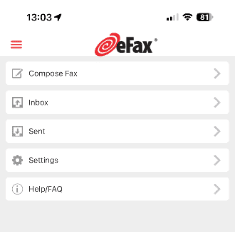
This app is not the easiest to use. For a start, upon installing it, we found that you could only enter your login details as an existing user – there was no way to sign up using the app – we had to go onto their website to do this, which isn’t convenient if you’re mobile and in a hurry.
Once you do sign up, the user interface is sometimes difficult to comprehend – with confusing icons and a more dated appearance than the other, slicker apps. A big plus however is the eFax ecosystem – you can use their website, and also send and receive faxes via email if you need to.
There’s also a huge issue we ran into, which is that the mobile app was broken a lot of the times when we tried to use it. The ‘New Fax’ button often just crashes the app – you can see this happening on two different devices in this video.
Pricing — 3/5
eFax feels far more aimed at large corporate customers than at regular consumers. Their website offers a low monthly price, but only 150 pages per month under their “Pro” package, which is lower than even the “Basic” option for Fax.Plus, and far below the unlimited pages that Municorn offers. To see their corporate pricing, you have to contact eFax directly. We had to give eFax a lower score due to the lack of flexibility and page limitations.
eFax also does what some other faxing services do – which is charge customers extra if a fax page takes over 60 seconds to transmit. Again, this is something the customer cannot control, and we were only informed of this after we signed up, which has forced us to mark it down on price compared to services that don’t do this.
Support — 5/5
eFax stands out for support – firstly being one of the few fax apps to provide a customer support phone line. They also respond to every negative review, to their credit. eFax is clearly well setup to provide large-scale support to their corporate customers, with extra security and features to cater to the corporate crowd, such as SAP integration. There’s a reason they are relied on by Fortune 500 companies for faxing.
Customer Feedback — 3/5
eFax has a 4.7 star average with over 25,000 ratings – a very strong showing – and a longer list of large corporate partners who can vouch for eFax as a strong choice for enterprises. This is clearly a very good choice for a business that needs heavier fax support than the average person. However, the broken app seems to have been a thing for a while – we can see reviews from back in March on the App Store showing people complaining about the same problem, and eFax responding with a copy and paste message. It’s very disappointing that eFax has known about this for months and still hasn’t fixed the problem.
7th MyFax by Consensus Cloud Solutions
Performance — 3/5
MyFax is readable enough to rely on – it’s good but not great. You’ll notice slightly blurry text on our test fax, and not-amazing image quality – but it’s all good enough for most faxing purposes.
The main concern for us is transmission speed – MyFax is the slowest out of all the apps on this list – our 2-page fax took over 8 minutes to send. This is a problem because you get charged per-page, and MyFax, like many other fax services, charges 1 page per minute when a page is sending. This means our 2-page fax ended up costing a lot more than 2 credits.
User-Friendliness — 2/5
MyFax’s app is simple, but not in a good way – for example, it offers an in-app ‘scanner’ for documents – however, unlike other faxing apps, it just uses the camera. There’s no adapted software which scans text and adapts the image into a document-style format – no border detection, no lighting adjustment – you just send a straight-up picture as a fax, which makes transmissions less readable.
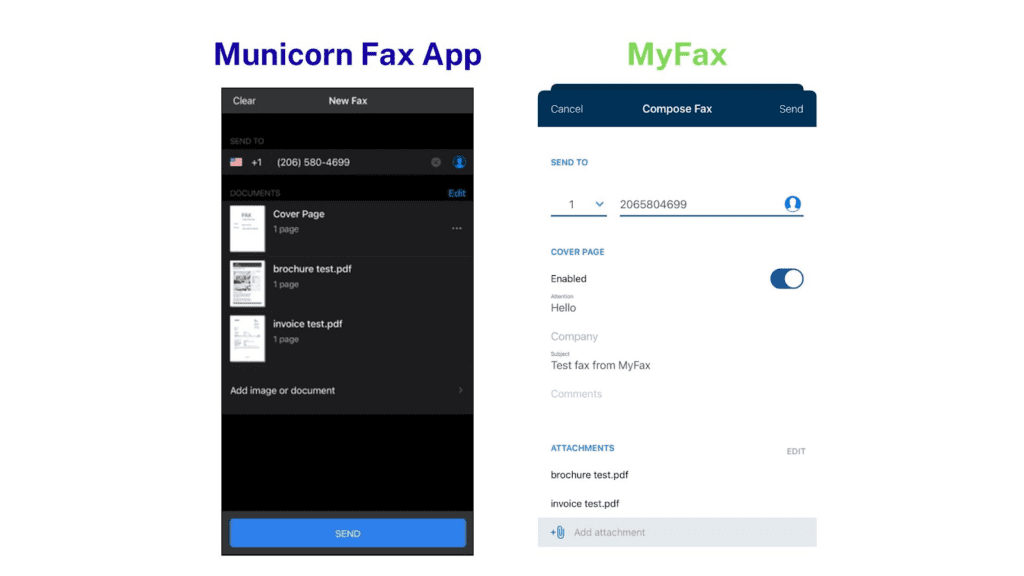
On top of this, it’s just a less thoughtful, less enjoyable app to use. Compare the two ‘send fax’ interfaces below – you can see on Municorn’s app, there’s useful features like a flag of the country you’re sending a fax to, a picture preview of your documents, and the recipient’s fax number in the proper format. With MyFax, it’s less formatted, and harder to read and review at a glance.
Pricing — 4/5
This is why people use MyFax – the basic package is $12 per month ($5 in the first month), which is a very cheap iPhone faxing service, and a great deal if you don’t do much faxing and aren’t too fussed about using a fancy app. It’s miles cheaper than keeping a fax machine too.
There’s flexibility too – you can pay even less if you get an annual subscription. However, it does charge extra to send faxes internationally, unlike apps like Municorn’s.
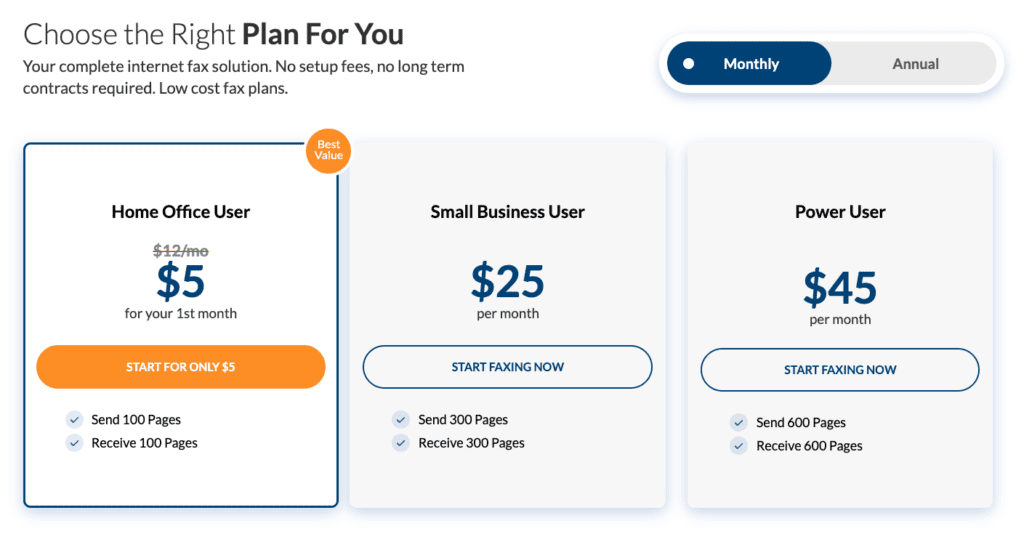
The Small Business User and Power User packages, however, are bad value – you can get much better deals on much better apps elsewhere, so we only like MyFax for low-volume users.
Support — 3/5
The good news is that there’s a long, useful FAQs section on the website, and a customer support number which you can fax if you need something – but that’s it, and most people don’t like having to send a fax as a means of contacting customer support – especially if you’re having trouble sending a fax!
Since it’s in the Consensus family, MyFax benefits from all the typical industry-standard security measures, which means it’s a fairly safe option to use, despite not offering HIPAA support to any customers.
Customer Feedback — 4/5
Nothing major to complain about here – the app has a 4.7 rating on the app store with thousands of reviews. There’s a few complaints about people having trouble unsubscribing, but those mostly look like misunderstandings. MyFax is a popular and generally well-reviewed app – we couldn’t find any major red flags in any reviews we looked at.